Ceiling access points, cabled and powered properly
Wireless network installation done properly starts with the cable, not the router
A wireless network installation is not a better router in a cupboard. It is a home run of cable to a ceiling access point in the right spot, on a switch with the PoE budget worked out before it was bought — the difference between one bar in the back room and a building that works everywhere at once.
ACMA registered cabler no. 42489 Installed to AS/CA S009:2020 Compliance statement every job
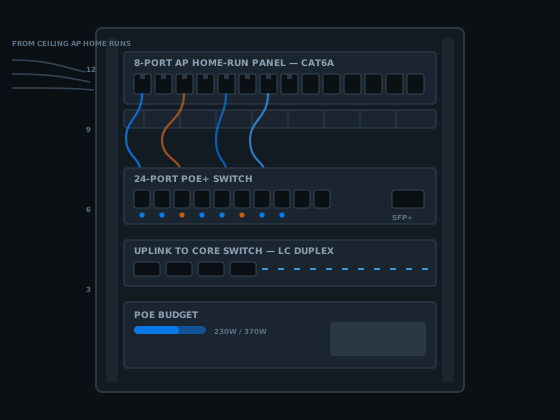
Most Wi-Fi complaints aren't Wi-Fi problems — they're a cabling problem wearing a Wi-Fi costume, one radio asked to cover square metres it was never going to reach through brick, concrete and a floor or two. The fix isn't a better router. It's more access points, each fed by its own cable, placed and powered on purpose.
This page is the access-point end of a wireless network installation: how many a floor needs, where they go, why a cabled unit beats a mesh node, and the PoE budget deciding whether a switch can run them all at once. For the law behind who can pull this cable, start with the registered cabler breakdown. Wiring a whole house is covered on the home network installation page, and a bigger fitout usually needs a comms rack installation to land the runs in.
What a wireless network installation actually involves
Strip away the marketing and it's a structured cabling job with a specific outlet on the end: an access point instead of a wall plate. The same rule applies as everywhere else in this trade — nothing daisy-chains. Each access point gets its own home run back to a switch, and that one cable carries both the data and the power.
What makes it its own job is the planning before a cable goes into the ceiling: how many access points the space needs, where each sits, what power class it needs, and whether the switch feeding them can supply that much at once. Skip one and you get a technically working install that still leaves a dead spot.
The home run
One dedicated cable per access point, back to a switch — no daisy-chaining one off another.
The power
Delivered down the same cable as PoE, sized to the class the access point needs.
Often it's one piece of a bigger build alongside switches and structured cabling for desks and cameras. Where that's the case, the IT network installation covers the rest of the stack.
Why the enquiry starts here
Why one router in the corner never covers a Brisbane building
The router almost never lands where it should. It sits wherever the NBN connection happened to come in — a garage, a front bedroom, a cupboard by the lift core — and is asked to cover a floorplan running away from it in one or two directions at once.
Brisbane buildings do it no favours. Brick cavity walls, tilt-slab concrete, tiled roofs with foil-faced sarking and steel-framed partitions all attenuate a wireless signal, and the faster bands suffer more of it than the older, slower ones. A phone showing three bars can still be moving almost nothing — bars measure signal strength, not the bandwidth getting through the wall.
One access point, better positioned, fixes some of that. It doesn't fix a building too big or too broken up for a single radio to cover alone — which is why a wireless network installation asks "how many access points, and where" instead of "which router".
How many access points a wireless network installation actually needs
There's a genuine rule of thumb, and it comes down to construction more than floor area alone. In open-plan space with plasterboard partitions, one access point comfortably covers 150 to 250 square metres. Once the walls turn to brick, block or concrete, that shrinks to roughly 80 to 120 square metres, because the building itself does most of the attenuating.
Run that against a typical Brisbane property and the numbers get concrete fast. A single-storey brick-and-tile house under about 250 square metres usually covers well from one central ceiling access point. A two-storey home needs at least two — one per level, since a signal loses more punching through a floor than through a stud wall. A 300 square metre open-plan office with brick core walls is often a two or three access point job, not the single unit floor area alone suggests.
Plan a little overlap on purpose. Coverage that just touches at the edges leaves a band where a device hunts between two access points and picks neither well. Ten to fifteen percent overlap is the number worth designing to.
Device density pushes the count up independently of area — a boardroom full of laptops needs more capacity per square metre than a warehouse floor with two scanners. A wireless network installation counts both the metres and what actually connects in them.
Where access points should physically go on a wireless network installation
Ceiling-mounted and central is the default for a reason: an access point's antenna pattern throws signal down and outward, so a unit fixed to the ceiling in the middle of the space it serves covers a rough circle around itself. The same unit shelved against an external wall throws half its coverage straight outside the building.

What to sit it near
The centre of the area it covers, with a clear line through the ceiling and enough height that furniture doesn't block the antenna pattern at desk level.
What to keep it away from
Metal ductwork, structural steel, distribution boards, and other 2.4 GHz devices — microwaves, cordless phone base stations — which block the signal or share its spectrum.
Leave a service loop
A metre of slack coiled above the ceiling lets an access point shift after a signal walk, without pulling a new cable.
The exact spot is rarely obvious from a floor plan alone. A short walk with a phone after the rough-in catches the column or switchboard a plan drawn at a desk missed — the last check before a wireless network installation's ceiling closes for good.
Why a wireless network installation beats mesh and wireless backhaul
A mesh system is a genuinely good product hamstrung by one decision: how the nodes talk back to each other. A node with a wireless backhaul reaches the main unit over the same radio it serves your laptop with, because Wi-Fi is half-duplex — a radio sends or receives, never both. Every hop back toward the router eats into the same pool of airtime the node hands out.
The practical effect: throughput roughly halves at every wireless hop. A node one hop from the router hands back around half of what a cabled unit delivers in the same spot; a second node relayed through the first loses close to half of what was left again. Tri-band mesh systems dedicate a separate radio band purely to backhaul traffic, softening the penalty — but not removing it, and adding a hop of latency a cabled access point never carries.
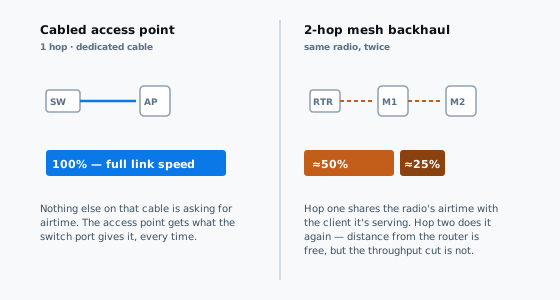
A cabled access point has none of that arithmetic to do — its cable carries nothing else's traffic, so it gets a full-speed path home whether it's the only unit on the switch or the tenth. Worth admitting against itself: running new cable into an existing ceiling costs real labour, and a mesh kit off a shelf is genuinely easier to self-install on day one. It's from month two onward, once the backhaul carries real traffic, that a proper wireless network installation shows the gap.
The PoE budget — how many watts a wireless network installation needs to find
A switch's PoE budget is the total wattage it can hand out across every powered port at once — a completely different number to the per-port maximum. A 24-port switch rated at 30 watts per port doesn't necessarily have 720 watts to give: plenty of real 24-port PoE+ switches on the market carry an actual budget closer to 370 to 400 watts, well under half the theoretical figure.
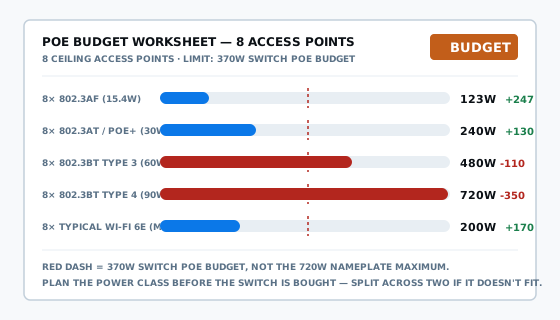
Run eight ceiling access points through that budget and the class chosen changes the answer completely. At basic 802.3af, eight units draw around 123 watts — nowhere near the limit. Step up to 802.3at (PoE+) and eight units draw around 240 watts, still comfortable. Step up again to 802.3bt Type 3, where a lot of current multi-radio access points sit, and eight units want around 480 watts — more than a typical 370 watt budget has to give, before a single camera or phone joins the same switch.
That's the whole point of doing the power budget on paper before the switch is bought, not after eight access points are already on the ceiling and three of them are quietly running degraded.
PoE, PoE+ and 802.3bt — which class a wireless network installation needs
Four classes cover almost everything an access point install meets, stepping up in roughly doubling amounts of power at the switch end.
| Class | Standard | At the switch | At the AP | Typical use |
|---|---|---|---|---|
| PoE | 802.3af | 15.4 W | 12.95 W | Basic dual-band access point |
| PoE+ | 802.3at | 30 W | 25.5 W | Most current Wi-Fi 5 / 6 access points |
| PoE++ Type 3 | 802.3bt | 60 W | 51 W | Multi-radio Wi-Fi 6E / 7 access points |
| PoE++ Type 4 | 802.3bt | 90 W | 71 W | High-draw combined units, rarely one AP alone |
Plenty of current Wi-Fi 6E and Wi-Fi 7 access points list 802.3at as a minimum but recommend 802.3bt to run every radio, the USB port and any Bluetooth beacon at once — a tri-radio unit can draw into the mid-40 watt range with everything switched on, above what PoE+ supplies. Checking that number on the actual datasheet, not the box, is what a proper wireless network installation quote is built on.
Choosing and sizing the switch for a wireless network installation
Size a wireless network installation's switch to the total budget the access points need, not the port count. Eight 802.3bt access points want a genuine 480 watt-plus PoE budget, a different product to an eight-port switch that just happens to have eight PoE-capable ports — count and budget are specified separately, and only one decides whether they run at full power. Budget roughly 20 to 25 percent headroom above today's load, so a camera or another access point next year doesn't tip an already-full switch over its limit; where the count needs more power than one switch can supply, two smaller switches with their own budgets beat one running flat out all day.
The switch itself usually lives in a rack alongside everything else the building runs on — how that gets sized, earthed and powered is covered on the comms rack installation page. Whether an electrician needs to be involved is a different question to who runs the cable; that boundary is explained on the electrician versus data cabling page.
Cat6 or Cat6A for access point cabling
Distance is not the deciding factor here. Both Cat6 and Cat6A carry a gigabit to the full 100 metre channel, and almost no ceiling access point run in a house or on a single floor gets anywhere near that limit. What tips the decision for a wireless network installation is heat, not length.
Where several PoE-loaded runs travel together through the same roof space in one bundle — three or four access points and a couple of cameras, say — Cat6A's thicker conductor carries the current with less resistance and less heat building up in the centre of the bundle than the same number of Cat6 cables would. It costs more per metre and it is stiffer to pull, but on a run actually carrying real PoE load in a wireless network installation, that trade-off is usually worth it.
Testing a wireless network installation
Every permanent link in a wireless network installation gets tested to the standard it was built to, exactly like any other data point — insertion loss, crosstalk, return loss and length, measured and handed over. That proves the cable is sound. It doesn't, on its own, prove the access point received the power class it needed — worth confirming the negotiated class at the unit matches its datasheet.
The legal side doesn't change because the outlet is an access point instead of a wall plate. Cabling that connects to a telecommunications network still has to be carried out by a registered cabling provider, or someone directly supervised at all times by one, under section 21 of the Telecommunications (Cabling Provider) Rules 2025, built to AS/CA S009:2020, free to read from the Australian Telecommunications Alliance. The fuller breakdown of what gets measured is on the cable testing and certification page.
What a wireless network installation costs
A wireless network installation prices the same way any structured cabling does — per access point run, covering cable, termination, testing and labelling, with the rate falling as the count goes up because roof access is shared across more runs. Fault finding and small additions run hourly, at published Brisbane rates around the $185 mark for standard hours.
Two things move a quote further than the cable itself. Access is the first — a walkable roof cavity above the chosen spots is a different job to a rendered two-storey with nothing to crawl through. The PoE switch is the second, because its price scales with the power budget it carries, not the ports on the front — an eight-port switch built for 480 watts of 802.3bt costs more than one built for 240 watts of PoE+. The full breakdown of what data cabling costs covers the numbers.
Ask what the quote assumes about power class. A price built around basic 802.3at access points won't cover 802.3bt units without a bigger switch — settle the access point model and its PoE requirement before comparing quotes on price alone.
Wireless network installation questions we get asked
How many access points does a typical Brisbane home or office need?
Budget one access point per 150 to 250 square metres of open-plan space with plasterboard walls, dropping to 80 to 120 square metres where walls are brick, block or concrete. Most single-storey Brisbane houses under 250 square metres cover well from one central ceiling access point; two-storey homes and brick-core offices usually need at least two.
Why does a mesh Wi-Fi node perform worse than a cabled access point?
A mesh node with a wireless backhaul talks to the main unit over the same radio it uses to serve your devices, so throughput roughly halves at every hop. Tri-band systems dedicate a separate backhaul band and soften that, but a cabled access point has none of it — every unit gets a full-speed path home.
How many watts does a PoE budget need to cover eight ceiling access points?
It depends on the class. Eight access points draw around 123 watts at 802.3af, 240 watts at 802.3at (PoE+), and 480 watts at 802.3bt Type 3 — more than the 370 to 400 watt budget many 24-port PoE+ switches actually carry. Check the class before assuming any switch will run them.
What's the difference between PoE, PoE+ and 802.3bt for an access point?
802.3af (PoE) delivers 15.4 watts at the switch, enough for a basic dual-band access point. 802.3at (PoE+) delivers 30 watts and covers most current units. 802.3bt Type 3 delivers 60 watts, where multi-radio Wi-Fi 6E and Wi-Fi 7 access points increasingly sit once every radio and port is switched on.
Where should a ceiling access point be mounted?
Central to the area it serves, flush or surface-mounted to the ceiling rather than shelved against a wall, and clear of metal ductwork, distribution boards and other 2.4 GHz devices sharing its spectrum. Leave a short service loop of cable — the exact spot often only becomes obvious after a signal walk, and slack lets it move without a new pull.
Can an existing PoE switch run out of power budget when access points are added?
Yes, and it happens often. A switch's PoE budget is a fixed total shared across every powered port, not the per-port maximum multiplied by port count. Adding a few 802.3bt access points to a switch budgeted for basic cameras and phones can push the total load past what a wireless network installation's switch can supply.
What can interfere with an access point's signal even when it's cabled properly?
A wireless network installation solves distance and airtime, not physics. Metal ductwork, structural steel, thick masonry, foil-backed insulation and other 2.4 GHz devices like microwaves and cordless phone base stations all still attenuate or share spectrum with a cabled access point. Placement away from those sources matters as much as the cable.
What happens if an access point doesn't get the PoE class it needs?
Most don't fail outright — they negotiate down. A multi-radio access point starved of power commonly disables one radio, drops transmit power, or falls back to a lower band rather than refusing to boot, which reads as a coverage complaint rather than a fault. Confirming the delivered class matches the datasheet is part of a proper wireless network installation.
Get a wireless network installation quote
Tell me what the building is, roughly how many access points you think you need, and whether it's a new fitout or an existing ceiling — usually enough to say whether it's a simple day or a harder one before anyone climbs into the roof.
Or call 07 3521 8082 directly. Voicemail usually means I'm up a ceiling somewhere; leave the building type and rough access point count and I'll call back.
ACMA registered cabler no. 42489 All work to AS/CA S009:2020