Apartments, townhouses & unit blocks — Brisbane & SEQ
The nbn PCD installation guide for apartments and unit blocks
This nbn PCD installation guide is not about a house. It's about the box that gets fitted at the fibre entry point of an apartment building, who has to sign off on it, and why the NTD inside your own unit is still entirely yours to deal with.
ACMA registered cabler no. 42489 Installed to AS/CA S009:2020 Compliance statement every job

A PCD on a house is a five-minute conversation: one box outside, one box inside, done. A PCD on an apartment block is a different animal entirely, because the box usually is not yours, the wall it sits on is not yours, and the person who has to approve it is not you either. That's the whole reason this nbn PCD installation guide exists as its own page.
For the carrier-versus-cabler boundary in general, start with the nbn cable installation hub. This nbn PCD installation guide goes one level deeper, into the one piece of kit that behaves completely differently once you're above a duplex.
What a PCD is — where any nbn PCD installation guide has to start
PCD stands for premises connection device. On a standalone house it's a small weatherproof box on the outside wall — nbn's own spec puts it at roughly 250 mm by 260 mm by 80 mm, mounted near the existing power and phone infrastructure, at least 400 mm above ground. It's the point where the fibre from the street physically ends and a short internal cable, run by nbn's own technician, carries the connection indoors to a second box called the NTD. A house-only nbn PCD installation guide could stop right there.
That description holds for a house. It does not hold for an apartment block, a townhouse complex or any building nbn classes as a multi-dwelling unit. In an MDU the PCD is frequently not on your wall at all — it's shared building infrastructure sitting at the fibre entry point, in a riser cupboard or the building's communications room, and it can be doing a completely different job: distributing one fibre feed out to dozens of apartments instead of serving a single household. That shift is what this nbn PCD installation guide is actually about.
On a house
One PCD, one property, one owner who can point at it and say "that's mine." Access, consent and who pays are never in question.
In a unit block
One PCD (or a bigger equivalent) can sit on common property and serve the whole building. Access, consent and cost all run through the body corporate instead — the case this nbn PCD installation guide actually covers.
The standalone version — every nbn PCD installation guide's baseline case
Worth setting out plainly, because it's the baseline everything else in this nbn PCD installation guide gets compared against. On a house, the fibre lead-in from the street terminates at the external PCD. A single internal cable — nbn calls it the premises internal cable — then runs from that box to the NTD mounted inside, on the same wall, within about 12 metres. The NTD needs to sit near a power outlet, because it's an active, powered device — a detail this nbn PCD installation guide will keep coming back to.
Everything past the NTD's data port is customer cabling. Wall plates, a study outlet, a ceiling point for Wi-Fi — none of that is nbn's to run, and none of it is covered by whatever was arranged with your retail provider. That boundary line doesn't move whether you live in a house or an apartment; what changes in an MDU, and what the rest of this nbn PCD installation guide is about, is everything upstream of it.
The part most guides skip
Why a multi-dwelling building needs a different nbn PCD installation guide entirely
nbn's own description of the difference is blunt: multi-dwelling units require additional work, including liaison with a body corporate, owners' corporation or strata management, alongside more extensive cabling than a single house ever needs. That's not marketing language — it's the reason MDU connection dates so often lag behind the houses next door.
The practical effect is that an nbn PCD installation guide written for apartments has to cover ground a house guide never touches: whose permission is needed before anyone drills a hole in common property, how one piece of shared equipment ends up feeding dozens of separate services, and what happens when a resident simply isn't home on the day a technician needs access to their unit.
The one line worth remembering: in an MDU, the PCD is rarely a private possession. It's building infrastructure, which means building-level rules — not household rules — decide when and how it gets installed. Every part of this nbn PCD installation guide from here on assumes that starting point.
One PCD, up to 32 apartments — the Building Fibre Device
This is the part of the nbn PCD installation guide most owners actually want: the specific mechanism, verified against nbn's own MDU Building Engineering and Design Standard. In a new development, a single PCD can be pressed into service as what nbn calls a Building Fibre Device — a BFD — and one PCD acting as a BFD is rated to serve up to 32 end user premises from one entry point. That's the technical answer to "why is there only one box for the whole ground floor."
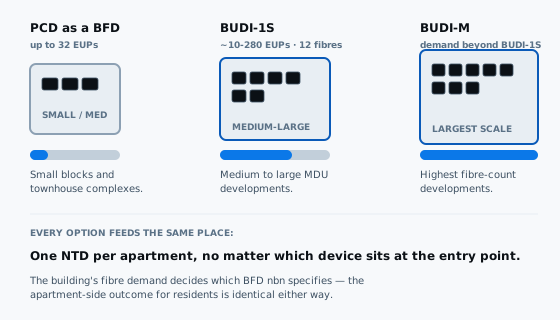
| Device | Typical scale | What it's for |
|---|---|---|
| PCD as a BFD | Up to 32 EUPs | Smaller blocks and townhouse complexes |
| BUDI-1S | Roughly 10–280 EUPs, 12 fibre cables | Medium to large MDU developments |
| BUDI-M | Fibre demand beyond a BUDI-1S | The largest developments on the fibre count |
None of that changes what happens at your own front door. Whichever device sits at the building's fibre entry point, the fibre gets split and run onward through the riser, and every apartment still terminates on its own NTD. The BFD is a wholesale distribution point, not a shared connection — nobody's service depends on a neighbour's box being open. That distinction is the whole point of this nbn PCD installation guide's apartment-block section.
Why an FTTB building has no PCD at all — the exception this nbn PCD installation guide has to cover
This trips people up constantly, so it's worth a section on its own. If your building runs on Fibre to the Building — the older MDU technology, common in blocks built before full fibre rollout reached them — there is no PCD and no NTD anywhere on the premises. Fibre runs to a node cabinet in the building's communications room, and from there the existing internal copper wiring carries a VDSL2 signal the rest of the way, ending at your telephone socket. Your provider posts you a VDSL2 modem and you plug it straight into that socket.
So if you've gone looking for "your" PCD in an FTTB apartment and found nothing, that's not a fault — it's the technology. That's also why so many FTTB buildings are now offered a full fibre upgrade: it's the only way a PCD and an NTD end up in the picture at all. Once that happens, everything else in this nbn PCD installation guide applies to a building that previously had neither device.
The NTD is still yours — the part of the nbn PCD installation guide that doesn't change
Whatever sits at the building's fibre entry point, nbn's own standard is unambiguous about the NTD: it provides the fibre connection from the network to each end user premises. Not to the building. To each apartment, individually, on its own box. A shared PCD or BUDI unit only ever handles fibre before it splits — the moment it reaches your front door, you're dealing with exactly the same single device a standalone house has. This is the constant every nbn PCD installation guide can promise, no matter the building.
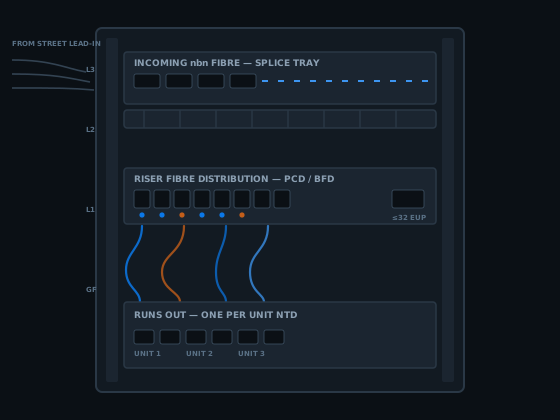
That matters practically, and it's the crux of this nbn PCD installation guide's advice: your NTD needs power, needs to be somewhere accessible, and is the point every private cabling job in the unit gets measured from. If a technician can't get into your specific apartment on installation day, the building doesn't wait for you — your NTD simply gets connected later, once you book it in.
Where most jobs actually stall
Body corporate first — who signs off an nbn PCD installation guide job
An individual apartment owner cannot order a whole-building fibre upgrade. That has to come from an authorised representative of the body corporate, owners corporation or building owner — the entity that legally controls the common property the PCD or BFD sits on. They register the building's interest with nbn, and once nbn confirms eligibility and issues a build quote, that same representative signs the Terms and Conditions Area Switch Agreement on the building's behalf.
Register interest
The authorised representative submits the building's details so nbn can assess eligibility for the upgrade.
Quote and agreement
nbn confirms a build quote and the Area Switch Agreement, which the representative signs for the collective title.
Site survey
nbn's construction partner needs access to common areas and individual units to plan exactly where the equipment goes.
One thing owners get wrong constantly: assuming a strata manager can simply wave a job through. In practice the vote and the paperwork sit with the owners committee or body corporate itself, and a single frustrated resident cannot force the building's hand any more than they could authorise a re-roof on their own. Getting that sequence right is most of what a workable nbn PCD installation guide has to teach a strata committee.
How the nbn PCD installation guide plays out for a whole building
Once the building is signed up, the process this nbn PCD installation guide is really about moves in stages, and it's worth knowing the shape of it before your body corporate agrees to anything.
The plan lands, then you get a say
nbn's construction partner surveys the site and returns an installation plan, typically within two to six weeks depending on complexity. Residents get ten business days to review it before it's locked in.
Every unit books its own appointment
The site contact distributes a QR code so each resident books their own installer appointment for the NTD. Nobody's individual delay holds up the rest of the building.
Infrastructure build
From an accepted plan, nbn estimates three to four months for the shared infrastructure — the PCD, BFD or BUDI, and the riser fibre — depending on the building's size and complexity.
Checked, then ready to connect
Quality and safety checks typically take another four to six weeks. Only after that is the building declared ready to connect and residents can order a service.
If you weren't home on installation day, that's not the end of it. Once the building overall is declared ready to connect, you can still arrange your own NTD installation by placing an order through your phone and internet provider — no extra fee for being the last one done. That flexibility is one of the more owner-friendly parts of this nbn PCD installation guide.
What an nbn PCD installation guide has to say about cost — and who pays
There's a customer co-contribution fee of $275 including GST, charged per individual unit and per common area service — a building's security system, an EV charger, anything else drawing its own connection counts separately at the same rate. That fee is a joint payment made by the body corporate, owners committee or building owner, not something nbn invoices each resident for directly.
How the body corporate recovers that cost from owners — a special levy, folded into quarterly fees, split evenly or by lot entitlement — is entirely a strata decision. nbn's agreement is with the building, not with individual apartments, and that's worth knowing before an owner assumes they can simply pay their own $275 and skip the queue. Any nbn PCD installation guide that skips this part is leaving out the question owners actually ask.
None of that carrier-side cost has anything to do with what a registered cabler charges for work inside your own unit afterwards. Those are two separate invoices from two separate parties, and conflating them is a common source of arguments at body corporate meetings — one this nbn PCD installation guide would rather you avoided.
Where this nbn PCD installation guide ends and a registered cabler's job starts
Neither the PCD nor the BFD nor the riser fibre is something a private cabler touches — that's nbn supplied equipment, installed by nbn's own construction partners. A registered cabler's work in an MDU begins exactly where it would in a house: at the NTD's data port, inside your own unit.
That single fact is the practical takeaway of this nbn PCD installation guide. From there, cabling that connects to a telecommunications network must be carried out by a cabling provider registered under the Telecommunications (Cabling Provider) Rules 2025, or by someone directly supervised at all times by one — the same federal requirement that applies to any house. Queensland adds nothing on top of it; an electrical licence has never been the right ticket for this work.
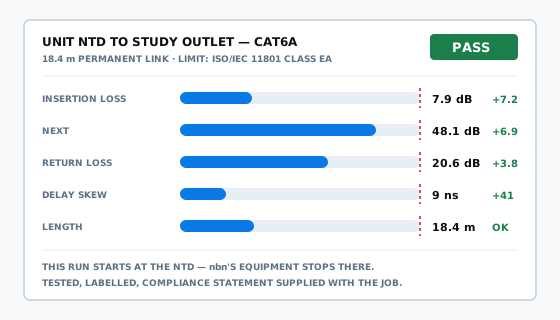
Practically, that means a second data point, a run to a study, or Wi-Fi coverage sorted with a proper ceiling access point in a unit is exactly the same job this nbn PCD installation guide would quote in a house — just done in a smaller footprint, often through a wall cavity shared with a neighbour rather than a roof space. For the equipment side of that — what actually gets mounted where once the NTD is live — the nbn equipment installation rundown covers it, and the NTD installation guide goes deeper on that one box specifically.
One more thing worth being precise about, and the last one this nbn PCD installation guide will labour: a registered cabler can lawfully work up to and connect at the NTD, but relocating nbn supplied equipment — including anything on the carrier side of the boundary — goes through nbn Co's own process, not a private trade booking. The detail on that sits in who can legally move an nbn box. For a couple of extra points once the carrier connection is live, data point installation is the more general page.
nbn PCD installation guide questions apartment owners actually ask
How many apartments can one nbn PCD serve in a unit block?
In new developments, nbn's building standard allows a single PCD to double as a Building Fibre Device serving up to 32 end user premises from one entry point. Bigger blocks use a BUDI-1S unit instead, covering roughly 10 to 280 apartments, or a larger BUDI-M where fibre demand is higher again. Either way, every apartment still gets its own NTD.
Does an FTTB apartment building have an nbn PCD at all?
No. Fibre to the Building stops at a node cabinet in the building's communications room, and existing internal copper wiring carries a VDSL2 signal the rest of the way to a modem plugged into the phone socket in each apartment. There is no PCD and no NTD anywhere in an FTTB unit — which is exactly why so many FTTB blocks are now being offered a full fibre upgrade instead.
Who has to approve an nbn PCD installation in a strata building?
The body corporate, owners corporation or building owner, acting through an authorised representative. They register the building's interest, sign nbn's Terms and Conditions Area Switch Agreement once a build quote is issued, and coordinate the joint co-contribution fee. Individual owners cannot request the whole-building upgrade on their own — it has to go through whoever legally represents the collective title.
Does every apartment get its own NTD even if the building shares one PCD?
Yes. nbn's own standard defines the NTD as the device that provides the fibre connection from the network to each end user premises, apartment by apartment, regardless of how the fibre arrived at the building. A shared PCD or BUDI unit at the entry point only handles the fibre before it splits — from there, every unit is wired and terminated separately.
What happens if my apartment block was never fitted with a PCD?
It gets installed as part of the connection process, not before. nbn tries to fit external equipment like a PCD during construction wherever it can, but in an existing MDU that never had full fibre, the PCD and the wiring back to it are added once the body corporate has approved an upgrade or a unit orders a qualifying service.
Can a registered cabler install or move an nbn PCD in an apartment?
No. The PCD and the fibre feeding it are nbn supplied equipment installed by nbn's own construction partners, not by a private cabler. A registered cabler's work starts at the NTD inside the unit — running, testing and certifying every data point from there, which is a different job to anything touching the PCD itself.
How long does an nbn PCD installation take across a whole apartment complex?
From an accepted installation plan, nbn estimates the infrastructure build takes three to four months depending on complexity, followed by four to six weeks of quality and safety checks before the building is declared ready to connect. Individual units are then booked in separately using a QR code the site contact distributes, so one resident's appointment does not hold up the rest.
What access does nbn need to install a PCD in my unit block?
Both common areas and individual units. nbn's construction partner surveys shared spaces such as risers and the comms room to plan the PCD or BFD location, then needs entry to each apartment to install and connect the NTD. If a resident is not available, that unit's installation can happen later once the rest of the building is ready to connect.
What does an nbn PCD installation cost per apartment?
A customer co-contribution fee of $275 including GST, per individual unit and per common area service such as building security or an EV charger. It is paid jointly by the body corporate, owners committee or building owner rather than billed to each resident directly, though how that cost gets recovered internally is a strata matter, not an nbn one.
What's the difference between the nbn PCD and the NTD in an apartment?
The PCD is the external connection point — on a house it is a small weatherproof box, in a unit block it is usually shared building equipment at the fibre entry point. The NTD is the internal box inside each apartment that you actually plug a router into. On a standalone home they can sit up to 12 metres apart; in a building the distance depends on the riser.
Get a quote for cabling beyond your nbn PCD
If your building's fibre upgrade is already sorted and you just need the inside of your own unit cabled properly — a second data point, a study run, a ceiling access point for better Wi-Fi — that's the job I quote. Tell me what the unit is and what's not working.
Or just call 07 3521 8082. If it goes to voicemail I am up a ceiling somewhere; leave a message and I will call back.
ACMA registered cabler no. 42489 All work to AS/CA S009:2020