One device, in depth — Brisbane & South East Queensland
The nbn NTD installation guide: models, mounting, power and status lights
Not the boundary in general — this nbn NTD installation guide is about one box. Which model is on your wall, where it's allowed to be mounted, why it needs mains power, the battery backup question if you run a medical alarm, and what each status light actually means before you ring anyone.
ACMA registered cabler no. 42489 Installed to AS/CA S009:2020 Compliance statement every job
Search "NTD" and most results talk around it — the boundary, the rules, the whole network story. This nbn NTD installation guide talks about the device itself: the box on the wall, the model it actually is, the rules that decided where it got mounted, and the four small lights that are more informative than most people realise.
For the wider carrier-versus-cabler boundary — what nbn Co does, what your provider does, and what only a registered cabler may lawfully touch — the nbn cable installation hub covers that ground properly. This nbn NTD installation guide goes one device deeper than the hub does, into the box itself, because that's the level of detail a general boundary page was never going to fit.
What this nbn NTD installation guide means by "the NTD"
Network termination device — NTD for short — is nbn's own term for the wall-mounted box inside a full fibre premises that turns the optical signal on the fibre into data your router can use. On this site, and in every nbn NTD installation guide worth reading, NTD and "connection box" mean exactly the same physical object. It is not the box outside on the external wall — that's the PCD, where the fibre lead-in from the street actually terminates — and it is not your router, which is customer-supplied and simply plugs into the NTD's data port.
This nbn NTD installation guide sticks to that one device deliberately. For the model, the mount, the power, the battery question and the lights, read on. For the outdoor box the NTD connects back to, the nbn PCD installation guide covers that half properly rather than squeezing it in here.
The nbn NTD installation guide's model line-up: 1-port and 4-port
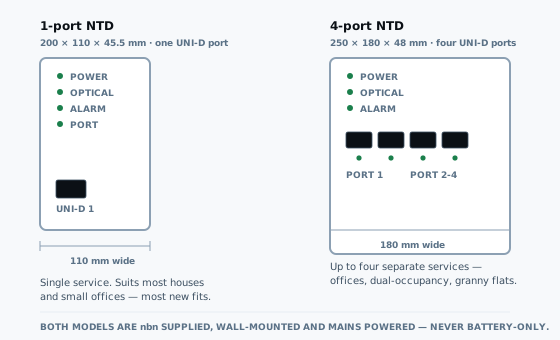
Every full fibre connection uses one of exactly two current NTD models, and which one turns up depends on what's been ordered, not on your address — the first thing any nbn NTD installation guide needs to get straight. The 1-port model is the default — a single UNI-D port for one service, sized up to 200 by 110 by 45.5 millimetres. The 4-port model is built for premises running more than one service off the same fibre lead-in, up to 250 by 180 by 48 millimetres with four UNI-D ports.
| Model | Max dimensions | Ports | Typical use |
|---|---|---|---|
| 1-port | 200 × 110 × 45.5 mm | 1 × UNI-D | Single service — most houses |
| 4-port | 250 × 180 × 48 mm | 4 × UNI-D | Multiple services, one lead-in |
Both are wall-mounted, both need mains power, and neither one is something you get to pick off a menu — the model fitted is whatever the order and the premises call for. The dimensions above come straight from nbn's own 1-port and 4-port connection box specification pages, not a guess. If the box on your wall doesn't look like either of these, the next section of this nbn NTD installation guide explains why.
Every nbn NTD installation guide should explain: which generation is on your wall
Ask which NTD generation you've got and most people can't answer, reasonably enough — nbn doesn't badge the box with a model year, which is exactly why this nbn NTD installation guide spells it out. There's a real difference worth knowing about, and it's one most nbn NTD installation guide write-ups skip entirely. From the Accelerate Great program's launch in September 2025, first-time connections and anyone ordering a fibre upgrade have been receiving next-generation NTDs: about 400 grams complete with power supply and wall bracket against roughly 1,165 grams for the previous generation.
The newer device also draws around 4.2 watts on average rather than 6.4 watts — a real difference on a device that stays powered around the clock. If your NTD predates September 2025 and nothing's failed, nbn isn't proactively swapping it; the newer device arrives with a first connection or an ordered upgrade, not on request. Fixed Wireless runs an entirely separate NTD line, unrelated to the full fibre device this nbn NTD installation guide is mostly about — an older diamond-shaped unit, still on roughly a quarter of Fixed Wireless services, and versions 3 and 4 that a call to your provider can get you swapped onto at no charge.
Not up to whoever's on site that day
Where the nbn NTD installation guide says the box can and can't go
nbn sets a location standard every accredited installer works to, and it's worth knowing before the appointment rather than after. The NTD mounts on the inside face of the external wall carrying the utility box, within a 12 metre radial distance of that box, and within 1.2 metres of an existing power point — or 3 metres if a safe extension lead is supplied. In a multi-storey building it has to sit on the ground floor.

Ruled out entirely: bathrooms, laundries, kitchen wet areas, anywhere under a window that opens, and — unless the layout genuinely leaves nothing else — garages and bedrooms. It also needs to be cool, dry, ventilated and out of direct sunlight, away from gas lines, with clear airflow around it once fitted. If none of that is achievable on the day, the technician has room to negotiate an exception on site; nothing in this nbn NTD installation guide overrides a call made in person.
Power requirements this nbn NTD installation guide has to be blunt about
The NTD is not a passive terminator sitting quietly on the wall — it's an active, mains-powered device, and every function on it depends on that power staying connected. That's the whole reason it has to land within reach of an outlet rather than wherever's convenient, and it's a fact this nbn NTD installation guide keeps coming back to. Pull the plug and the box stops doing anything at all: no lights, no data, no service, regardless of what's happening on the fibre side of the wall.
That single fact trips people up during a renovation or a repaint more often than you'd think. Unplugging the NTD briefly to shift a power board is fine. Leaving it unplugged because a power point got relocated and nobody mentioned it is how a working connection turns into a fault call that was never actually a fault. If the wall it's mounted on is coming out, that's a job for a registered cabler or nbn Co — not a DIY unplug-and-relocate.
Battery backup, medical alarms and security systems — the question this nbn NTD installation guide takes seriously
Battery backup used to come standard with every new full fibre connection — this nbn NTD installation guide would be out of date if it still said so. It doesn't any more. Since June 2024 nbn stopped supplying Power Supply Units with battery backup by default, and if you want one now you arrange it through your phone and internet provider, not by asking the technician on installation day.
Where a battery is fitted, it buys the NTD alone roughly five hours during a mains outage — not your router, not your Wi-Fi, nothing else in the house. A red light beside "Replace Battery" plus an alarm tone every 15 minutes means the battery — a standard 12V, 7.0 to 7.2Ah, 6-cell SLA unit — needs swapping, available through Battery World and Marshall Batteries outlets.
This is the part worth taking seriously, and the reason this nbn NTD installation guide gives it a section of its own. If a medical alarm or a monitored security system in the house depends on a phone line or the NTD staying powered, do not assume backup is included — it isn't, unless it was specifically ordered. nbn's own advice is to check compatibility directly with the alarm provider, and to consider a unit with its own battery and mobile connectivity rather than leaning on the NTD's backup. nbn does not run Priority Assistance itself; Telstra is required by the Australian Government to offer it for life-threatening medical conditions, and other providers may offer comparable arrangements.
Troubleshooting nbn NTD status lights, light by light
Four lights, and between them they tell you almost everything worth knowing before you pick up the phone — the part of this nbn NTD installation guide most people bookmark. Power shows whether the box has electricity and whether it's finished starting up. Optical shows whether the fibre connection itself is alive. Alarm should be off, always — lit means something inside the device has failed. Port shows whether a service is running and whether it's currently moving data.
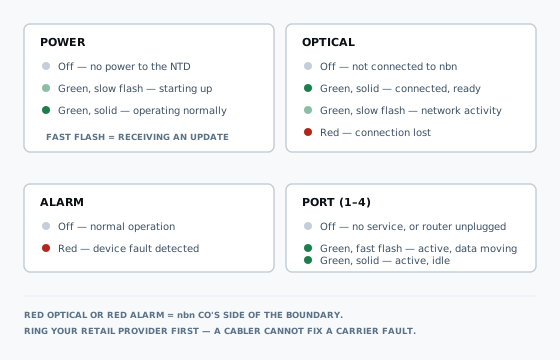
The distinction worth remembering: a red Optical or red Alarm light both sit on nbn Co's side of the boundary. Neither is something a registered cabler can fix, however capable they are, because the fault is inside carrier-supplied equipment before the point where private cabling starts. Ring your retail provider, tell them which light is red, and they'll run a remote diagnostic before anyone needs to attend. A green Port light with no service showing usually means nothing's been ordered on that port yet — not a fault at all.
Where nbn Co stops
Where this nbn NTD installation guide ends and a registered cabler's job begins
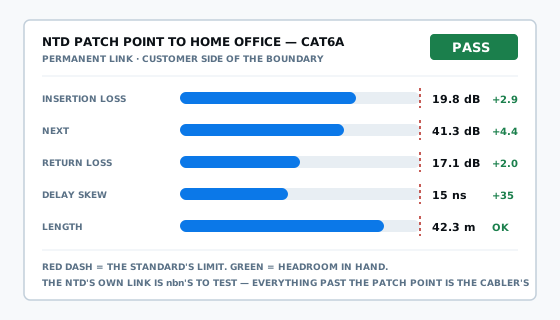
Everything covered so far in this nbn NTD installation guide — the model, the mount, the power, the lights — is nbn Co's equipment and nbn Co's responsibility. A registered cabler's job starts precisely at the NTD's data port, on the customer side of that boundary, not a centimetre before it.
In practice, and this is the one line of the nbn NTD installation guide worth remembering, that means a lead from the data port to a patch point or straight to a router, then every wall plate, ceiling point and additional outlet run, tested and labelled from there — none of it touching the NTD itself. For what physically gets mounted where across every nbn technology rather than this one device, the nbn equipment installation rundown covers the broader picture. For adding outlets once the NTD is live, data point installation is the more general job.
The law behind private cabling past the nbn NTD
This is the part of any nbn NTD installation guide that isn't nbn's to explain — it's federal legislation, and it applies whether a cabler mentions it or not. Cabling that connects to a telecommunications network — everything past the NTD's data port — must be carried out by a registered cabling provider, or by someone directly supervised at all times by one. That's section 21 of the Telecommunications (Cabling Provider) Rules 2025, commenced 31 March 2025, and it applies to a two-point home addition exactly as much as an eighty-point office fitout.
Queensland adds nothing extra on top of it — section 55(3) of the Electrical Safety Act 2002 says plainly that an electrical work licence isn't required for telecommunications cabling, so "fully licensed electrician" tells you nothing about whether someone may lawfully touch the wiring past your NTD. Registration is issued to individuals, never companies, which is why the honest phrasing here is work carried out by an ACMA registered cabler, registration no. 42489, detailed on the ACMA's own cabler registration page.
What cabling work beyond the NTD costs
The carrier connection itself is arranged and priced through your retail provider — nothing in this nbn NTD installation guide changes that half of the bill. Cabling work beyond the NTD is quoted like any other job: per point for new outlets, covering the cable, both terminations, the wall plate, testing and labelling, or hourly for fault finding and small additions.
What moves the number is access to the wall the NTD sits on, not the cable itself. A roof cavity running straight over that wall makes for a short, simple job. A rendered wall with no cavity access nearby is a different quote entirely — which is why nobody serious prices work off the NTD over the phone without seeing photos or asking a few questions first. That is as far as any nbn NTD installation guide can go without actually seeing the wall in question.
Care and relocation — the last piece of this nbn NTD installation guide
Looking after the NTD day to day is simple, and this nbn NTD installation guide's advice here is short: a dry, lint-free cloth if it needs a wipe, never water, and clear space around it so it isn't starved of airflow. It stays nbn's property and stays at the premises if you move out — it doesn't travel with you.
Relocating it is the one thing that isn't a DIY job or even always a cabler's job. A registered cabler can move it under nbn's Authority to Alter guidelines, which may carry a charge, or you go through nbn Co's own relocation application. The full detail on who does what and what it costs sits in who can legally move an nbn box. For the outdoor half of the same setup, the nbn PCD installation guide covers the box this one connects back to.
Not connected yet? The nbn installation guide walks the whole appointment from booking to sign-off, and nbn install covers what triggers a new connection in the first place and how it gets priced.
nbn NTD installation guide questions I get asked
What is the nbn NTD and is it the same thing as the nbn connection box?
NTD stands for network termination device, and on a full fibre connection it's the same object nbn calls the connection box — the wall-mounted unit inside your premises that turns the fibre signal into data your router can use. It is not the same as the PCD, which is the separate box outside where the fibre lead-in from the street actually ends.
What's the difference between the 1-port and 4-port nbn NTD?
The 1-port model measures up to 200 by 110 by 45.5 millimetres and carries a single UNI-D port for one service — what most houses and small offices get. The 4-port model is larger, up to 250 by 180 by 48 millimetres, and can run up to four separate services from one box, which suits granny flats, dual-occupancy sites and small offices needing more than one connection.
Where does the nbn NTD have to be mounted inside a house?
On the inside face of the same wall the nbn utility box sits on outside, within a 12 metre radial distance of it, and within 1.2 metres of an existing power point — 3 metres if a safe extension lead is used. It has to be a cool, dry, ventilated spot away from direct sunlight and gas lines — never a bathroom, laundry, kitchen wet area or a room with a window that opens.
Does the nbn NTD need its own power point?
Yes. The NTD is an active, mains-powered device, not a passive termination point — nothing about it works without power. It has to sit within 1.2 metres of an existing outlet, or 3 metres if you're supplying a safe extension lead on installation day. If that outlet fails, the whole connection goes down with it, backup battery or not.
Does nbn still include a battery backup with a new NTD installation?
Not by default. Since June 2024 nbn no longer supplies Power Supply Units with battery backup as standard — if you want one, you arrange it through your phone and internet provider. Where fitted, the battery gives the NTD alone about five hours of power during an outage; it does not back up your router, your Wi-Fi or anything else in the house.
Will nbn's battery backup keep a medical alarm or security system running in a blackout?
Only the NTD itself, and only if a backup battery was actually ordered — it was never automatic. nbn's own guidance is to check compatibility directly with your alarm provider and consider a unit with its own battery and mobile connectivity instead of relying on the NTD. nbn does not provide Priority Assistance itself; Telstra is required by government to offer it for life-threatening medical conditions.
What does a red Optical light on the nbn NTD mean?
Connection lost — and it's on nbn Co's side of the boundary, not something a registered cabler can fix. A steady green Optical light means connected and ready; a slow green flash means normal network activity. Red means ring your retail provider and tell them the light colour — they'll run a remote test before anyone needs to attend in person.
What does a red Alarm light mean on an nbn NTD?
A device fault inside the NTD itself. It sits off during normal operation, so a red Alarm light is unusual enough to be worth a call to your retail provider straight away rather than waiting to see if it clears. Like the Optical light, it's carrier-side — a cabler's work starts on the other side of the box entirely.
Can I clean the nbn NTD myself, or unplug it before painting?
Cleaning is fine with a dry, lint-free cloth — never water or any liquid. Unplugging briefly while you're away, replacing a battery, or when your provider directs it is normal. What you can't do is relocate it yourself — that's either a registered cabler working under nbn's Authority to Alter process or an nbn relocation application, not a five-minute DIY job.
Get a quote for cabling beyond your nbn NTD
If the NTD is already live and you just need the rest of the place cabled properly — a study run, extra data points, a ceiling access point for better Wi-Fi — tell me what's on the wall and what you need reaching. That's the second half of every nbn NTD installation guide: the box is nbn's, everything past it is mine to quote.
Or just call 07 3521 8082. If it goes to voicemail I am up a ceiling somewhere; leave a message and I will call back.
ACMA registered cabler no. 42489 All work to AS/CA S009:2020