Brisbane & South East Queensland
IT network installation runs on two trades, not one
IT network installation gets talked about as if it's one job. It isn't. A registered cabler pulls, terminates and tests the physical cable — the copper and fibre in the walls and the rack. An MSP configures what plugs into it: the switches, the firewall, the VLANs, the Wi-Fi controller. Confuse the two and half the quotes you get won't match the other half.
ACMA registered cabler no. 42489 Installed to AS/CA S009:2020 Compliance statement every job
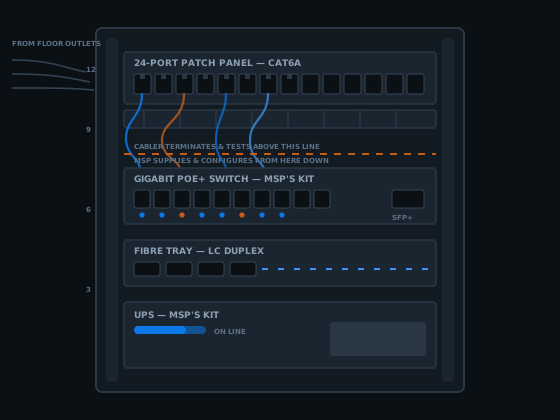
Ask five people what IT network installation means and you'll get five different scopes. Some think it's the cable in the wall. Some think it's the switch config. On a real job it's both, done by two different trades that rarely share a business card. This page draws the line: what a registered cabler does, what gets handed to an MSP, and what to have sorted before either one turns up.
If you're already sure it's the physical side you need sorted, the detail on registration classes and what one actually authorises sits on the registered cabler Brisbane page. This page is about the join between the two trades — the point where an IT network installation project either goes smoothly or falls into a gap nobody owns.
What IT network installation actually covers
Say "IT network installation" to a builder, a business owner and an MSP and you'll get three different pictures. The builder is often thinking about the electrician's scope. The business owner is thinking about the internet working. The MSP is thinking about the switch config they haven't been paid to do yet. None of them is wrong — they're describing different halves of the same project.
Split an IT network installation in two and it gets simple fast. The physical half is fixed cable: Cat6A or fibre run from a comms room to outlets, terminated onto a patch panel, tested against AS/CA S009:2020 and certified. That's cabling, and in Australia it's federally regulated work — only a registered cabling provider, or someone directly supervised by one, may lawfully do it.
The logical half is everything that runs on top of that cable once it's live: switch configuration, VLANs, routing, firewall rules, Wi-Fi, DHCP, and whatever servers or cloud services sit behind it. That's IT, and it isn't cabling regulation at all — it's a different skill set, usually supplied by an MSP or an in-house IT person. That split is the spine of every IT network installation job on this page.
The part that's regulated
Where cabling stops on the way to an IT network installation
A registered cabler's authority is specific, and the Telecommunications (Cabling Provider) Rules 2025 draws the line clearly. Cabling that connects to a telecommunications network — the cable itself, the termination, the patch panel, the testing — is regulated work under section 21, and only a registered cabling provider, or someone directly supervised by one, may lawfully perform it. That comes from the Telecommunications (Cabling Provider) Rules 2025, which commenced 31 March 2025.
On any IT network installation, that authority stops at the outlet, the patch panel port, or a network termination device. It does not extend to what plugs into any of those points. A cabler can terminate a Cat6A run onto a patch panel port and hand over a passing test result. Logging into the switch on the other end of that port, assigning it to a VLAN, or setting a firewall rule three hops further along — none of that is cabling, and none of it sits under a cabling registration.
This isn't a technicality. It's the reason a cabler quoting an IT network installation project should be quoting the physical half only, unless they've been upfront that the IT configuration is being subcontracted or covered some other way.
Where IT starts once the cable goes live
Everything past the patch panel port is IT, not cabling. A switch has to be configured — VLANs assigned, ports set to access or trunk, spanning tree sorted so a loop doesn't take the whole floor down. A router or firewall needs rules written for what traffic is allowed where. Wi-Fi needs SSIDs, a controller, and access points tuned so they don't fight each other for the same channel — the sort of detail covered properly on the Wi-Fi access point cabling page.
None of that is exotic, but it's a genuinely different trade from pulling cable. An MSP or an in-house IT person handles it, usually with their own tools — a switch's management interface, a firewall's console, a cloud dashboard for whatever's hosted off-site. A cabler with no IT background touching any of that is a bigger risk than the job is worth, for both sides of an IT network installation project.
The two halves of an IT network installation meet at exactly one point: the tested, certified, physical link the cabler hands over. Everything on the cabler's side of that point is regulated cabling work. Everything past it is configuration, and that boundary is the whole reason this page exists.
The handover: what a cabler gives your MSP
At the end of the cabling side of an IT network installation, a registered cabler hands over four things: tested and certified permanent links, a patch panel labelled to match the outlet numbering, printed test results for every run, and the written compliance statement required under section 25 of the Cabling Provider Rules — supplied regardless of whether the invoice is paid. Testing is covered in more depth on the cable testing and certification page.
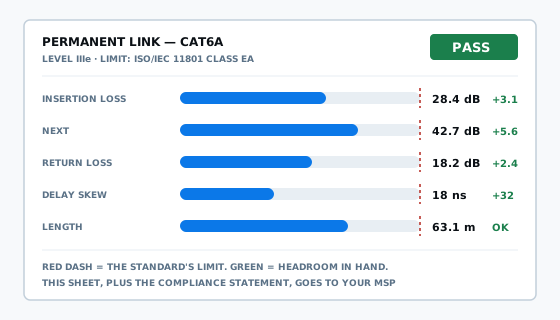
That package is the starting point for the IT side of any IT network installation. An MSP configuring switches wants to know which physical port maps to which room before they build a VLAN plan around it — a patch panel labelled "Port 14 → Meeting Room 2" saves someone crawling under a desk with a cable tester six months later. Good labelling is cheap on the day it's built and expensive to reconstruct afterwards.
None of this replaces an actual handover conversation. The cabler should walk the MSP, or whoever's configuring the network, through the patch schedule before the fitout goes live — five minutes that saves a support ticket a week later when nobody can work out which port feeds which desk.
How an IT network installation project runs, start to finish
Most IT network installation projects run in a sequence, even when the two trades never speak directly. Skipping a step is usually what turns a straightforward fitout into a scramble on go-live day.
Network design
The MSP, or whoever's handling IT, works out the VLAN structure, the IP addressing and roughly how many switch ports each area needs. This drives everything quoted next.
Cabling quote
The cabler quotes to that design — outlet count, cable category, comms room location — rather than guessing at a generic number that might not match what the network needs.
Rough-in and termination
Cable is pulled and terminated to a patch panel schedule that mirrors the switch port plan, so port 14 really is meeting room 2 when someone goes looking for it.
Test and certify
Every permanent link is tested against the standard, results and the compliance statement are handed over, and the physical side of the job is done.
Configure and go live
The MSP racks the switches and firewall, applies the VLAN and routing config, sets up Wi-Fi, and brings the network live on cabling that's already proven to work.
It stays supported
Add a point later, move a desk, chase a fault — the labelling and test records mean whoever gets called next starts with information instead of guesswork.
Before the van turns up
What to have ready before IT network installation begins
A cabling quote is only as good as the information behind it. Before calling a cabler for an IT network installation job, it's worth getting a few answers from whoever's handling the IT side.
VLAN and traffic plan
How many separate networks — data, voice, cameras, guest Wi-Fi — need their own physical runs. This affects outlet count more than most people expect.
Access point count and location
Ceiling points for wireless coverage, cabled rather than relying on mesh, because a cabled access point outperforms a wireless-backhauled one every time.
PoE requirements
Cameras, access points and phones drawing power over the cable change the cable spec and sometimes the switch spec too — worth confirming before quoting, not after.
Cable category
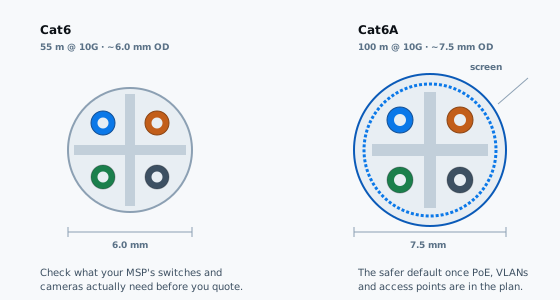
Cat6 or Cat6A — driven by run length, PoE load, and whether 10 gigabit is realistically on the horizon for that link.
Comms room location
Where the patch panel and switch actually live changes every horizontal run's length, and whether the 100 metre channel limit becomes a real constraint.
Labelling convention
Agree the naming scheme with the MSP before termination starts, so the patch panel and the switch config use the same port references from day one.
Who to engage for the IT side of an IT network installation
An MSP — a managed service provider — is the usual answer for a business. They handle the network configuration, the servers, the cloud services and ongoing support, usually on a retainer rather than a one-off callout. For a smaller operation, an in-house IT-literate staff member or a freelance IT contractor can cover the same ground on a simpler network.
Either way, the person configuring the network and the person pulling the cable don't need to be the same business, and on most jobs they aren't. What matters is that both sides know where their scope ends, and that the cabler's handover package — test results, labelling, compliance statement — actually reaches whoever's doing the configuring.
If nobody's engaged an MSP yet for the IT network installation and the network needs real configuration — more than a single switch and a router — it's worth sorting that out before the cabling starts, not after, so the physical layout matches the network design instead of the other way around.
The rack: whose gear, whose job
A comms rack usually holds equipment from both trades, which is exactly where IT network installation confusion tends to start. The patch panel, the cable management, and often the rack itself are the cabler's territory — installed, labelled and left ready, as covered on the comms room and rack installation page.

The switch, the router or firewall, and any server hardware are the MSP's kit, and configuring it is the MSP's job even when the cabler is the one who physically screws it into the rails. A cabler can usually rack-mount active equipment as a straightforward task — ask whether that's included in the quote — but logging into it and setting it up is a different scope entirely.
Cable management and labelling inside the rack matter more than they look like they should. A rack where every patch lead is dressed and every port is labelled turns a fault call into a five minute fix. A rack where nobody labelled anything turns the same fault into an afternoon, and it's usually the MSP who inherits that cost on an IT network installation, not the cabler.
When cabling gets blamed for an IT problem
The most common support ticket that lands on the wrong trade's desk is "the internet's down" or "Wi-Fi keeps dropping." Sometimes that is a cabling fault — a termination that's failed, a cable damaged during another trade's work, a port negotiating at 100 megabit instead of a gigabit. Testing settles that quickly, either way.
Just as often, the cable tests clean and the problem sits entirely on the IT side: a DHCP scope that's run out of addresses, a VLAN set up wrong for a new device, an access point placed badly, or a firewall rule blocking something it shouldn't. None of that gets fixed by pulling more cable, and calling a cabler back to "fix the network" on one of these jobs is a wasted callout for everyone.
The fix is knowing which trade owns which symptom before the callout happens. A cabled link that tests to standard has done its job. Everything past that point — and most of what actually breaks day to day — sits with whoever configured the network on an IT network installation project, not whoever pulled the cable.
Getting both halves right
Choosing a cabler and an MSP that work together
The two trades don't need a formal relationship, but on an IT network installation they do need to talk. On a fitout of any size, it's worth introducing the cabler and the MSP, or at least making sure the patch schedule and the VLAN plan reference the same port numbers before either one starts work.
The same boundary question comes up with other trades too — an electrician can hold a cabling registration alongside their electrical licence, and it's worth checking which one applies before assuming the sparky already has it covered; see do you need an electrician for data cabling for that specific distinction. On larger jobs run through a head contractor, engaging a data cabling contractor directly can simplify who's accountable for the physical side.
For the cabling half specifically — testing, certification, the compliance statement — the detail on registration classes and how to verify one sits on the registered cabler Brisbane page, and the registration itself can be checked against the ACMA cabler registration information. Get that half right, hand a clean package to the MSP, and an IT network installation project has a real chance of going live without a scramble.
Questions people ask about IT network installation
What's the difference between IT network installation and data cabling in Brisbane?
Data cabling is the physical layer — the Cat6A or fibre run from a comms room to an outlet, terminated and tested against AS/CA S009:2020. IT network installation, in the fuller sense, also includes what runs on top of that cable: switch configuration, VLANs, firewall rules and Wi-Fi. A registered cabler does the first. An MSP does the second.
Does a cabler configure my switches and firewall during IT network installation?
No. A registered cabler terminates and tests the cable, and can physically mount a switch or router into a rack if asked, but configuring VLANs, firewall rules, routing or Wi-Fi controllers sits outside a cabling registration entirely. That work goes to an MSP or your in-house IT person, either before or after the cabling is finished.
Who do I call for the cabling and who do I call for the network configuration?
For the physical cable — data points, patch panel, comms room, testing and certification — call a registered cabler. For the switch config, VLANs, firewall, Wi-Fi and anything running on servers or in the cloud, call an MSP. On most IT network installation projects both get engaged, usually the MSP first to set the design.
What does a cabler hand over at the end of an IT network installation job?
Tested and certified permanent links, a patch panel labelled to match the outlets, printed test results for every run, and the written compliance statement required under section 25 of the Cabling Provider Rules. That package is what an MSP needs before they plug anything in and start configuring.
Can the same person do both the cabling and the IT configuration on one job?
Occasionally, if they hold both a cabling registration and genuine IT experience, but it's uncommon — the two skill sets rarely sit in one business. More often an IT network installation project runs as two separate trades coordinating around the same job, which is normal and usually cheaper than expecting one generalist to cover both well.
What do I need from my MSP before an IT network installation project starts?
A VLAN plan, the number and rough location of access points and cameras, and whether any runs need to carry PoE. That tells the cabler how many outlets to run, where the comms room needs to sit, and whether the job should be specified in Cat6A rather than Cat6.
Will my cabler mount the switch and router in the rack?
Often, yes, as a physical task — screwing a switch into the rack rails and dressing the patch leads is straightforward cabling work. What a cabler won't do is log into that switch and configure it. Ask upfront whether rack-mounting the active gear is included in the cabling quote or billed separately.
Why does my Wi-Fi still drop out after IT network installation is finished?
Usually because the cabling and the configuration are two different problems. A cabled point that tests clean rules out the cable. From there it's a configuration question — access point placement, controller settings, channel congestion or a VLAN set up wrong for guest traffic — and that sits with whoever configured the network, not whoever pulled the cable.
How do a cabler and an MSP coordinate on a new office fitout?
Usually the MSP designs the network first — VLANs, IP addressing, how many switch ports — and the cabler quotes the physical side to match: outlet count, patch panel schedule, comms room location. The cabler installs and certifies, then the MSP racks and configures the active equipment once the tested cabling is handed over.
Get the cabling half of your IT network installation quoted
Tell me what the fitout or install is for this IT network installation, and whether an MSP is already involved. I'll quote the physical cabling — data points, patch panel, testing and certification — and work to whatever VLAN or port plan your IT side has already settled on.
Or just call 07 3521 8082. If it goes to voicemail I am up a ceiling somewhere; leave a message and I will call back.
ACMA registered cabler no. 42489 All work to AS/CA S009:2020