Brisbane & South East Queensland
Data point installation in Brisbane — one outlet, done properly
Data point installation is the smallest thing anyone buys from a cabler: one socket on one wall, wired back to wherever the modem or the switch lives. It is also the job most often guessed at, because it looks too simple to get wrong.
ACMA registered cabler no. 42489 Installed to AS/CA S009:2020 Compliance statement every job
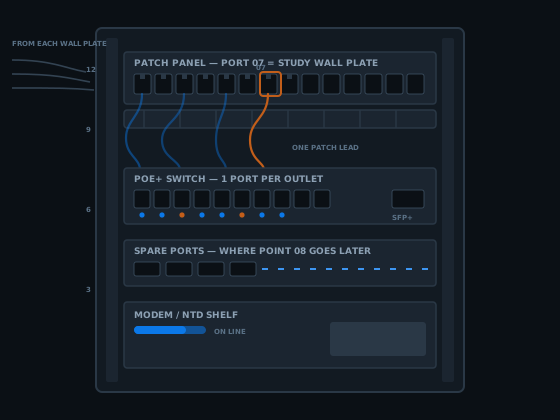
Nearly every large job I have quoted started as somebody wanting one point. The TV hardwired. The back bedroom off Wi-Fi. One camera fed properly instead of hanging off a powerline adaptor. So this page is built around that single outlet, because the decisions that cost real money are all made at that scale.
Get the cable, the position and the path right on point one and the rest are cheap. Get them wrong and every later data point installation in the building inherits the mistake.
What a data point installation is, from the plate to the panel
A data point is one network socket with its own cable and nothing sharing it. The Wiring Rules define a Telecommunications Outlet as a connecting device an ordinary person may plug equipment into, and a wall plate as the face plate holding one or more of those sockets. Two parts, two decisions.
Follow it from the room end. The socket is a keystone jack — a snap-in module with eight contacts, punched onto the four pairs of a solid-core cable. Behind the plate the cable goes up the wall cavity, into the roof space, across and down to wherever the gear lives.
The wall plate
The visible bit. Plates come in one, two, four and six-socket versions, so a two-gang plate fitted with one socket today takes a second later without touching the wall.
The keystone jack
The socket itself, and the part cheap work ruins. Pairs stay twisted right up to the punch-down and the module clips home square.
The cable
One solid-core four-pair run, unbroken from plate to panel. No joins, no junction boxes. Too short means pulled again, not extended.
The panel port
The far end, punched down and numbered so outlet and port match. On a small job that may be a four-port surface box rather than a rack panel.
The patch lead
Stranded, flexible, factory made. It joins panel port to switch port, and it is the only part of the chain anyone is meant to unplug.
The label
Same number both ends. Costs nothing today, saves an hour of tracing every time somebody opens the cabinet for ten years.
That whole chain is one data point installation, and those six items are what "per point" pricing covers. Ask which of them a cheap quote has left out — it is almost always the last two.
This is the outlet-level view. How outlets group into comms rooms, backbones and floors sits in structured cabling design for Brisbane buildings; the rest of the trade is on the network cabling home page.
How many points a room needs before a data point installation is worth doing
The commercial answer has been settled for decades: plan a work area for roughly every ten square metres of usable floor space, and give each work area a minimum of two telecommunications outlets. That is the convention the international commercial building cabling standard is built on, and it is a sane starting point for any data point installation.
Two per desk sounds generous until you count what plugs in. A dock. A desk phone. A monitor with a network port. A shared printer. The moment somebody puts a five-dollar switch under a desk to find a second port, the design has already failed.
Office desks
Two per position, minimum. Four in a boardroom, split between the table box and the display wall. Reception gets three — it always ends up with a printer and a visitor screen nobody planned for.
Ceiling access points
One dedicated run per wireless access point, landed in the ceiling rather than a wall. These are the runs people forget until the plasterboard is up.
Cameras and door controllers
One point each. They are just powered data points, and a PoE camera wants its own run back to the switch — never a splitter, never a shared cable.
The house version
Study desk two, TV wall two, a ceiling point mid-house, one at the NBN box if it landed somewhere useless. Five points covers a family home for a decade.
The rule I actually use: cable the places that will not move. Walls, ceilings and TV recesses do not move; desks do. If you are unsure about a spot, that is an argument for putting it in the data point installation now — the marginal cable is the cheapest thing on the invoice.
Where the outlet goes — the part of a data point installation people get wrong

Height first. A desk point at standard power-point height disappears behind furniture and stays usable. A TV point wants to sit inside the recess or directly behind the screen, not 300 mm below where the lead loops back up.
Then separation from power, which is not preference but the standard. AS/CA S009:2020 requires telecommunications cabling to stay 50 mm clear of low voltage power cable along the run and 150 mm clear at terminations, unless a permanent, rigidly fixed barrier of insulating material or earthed metal sits between them.
So the data plate sits beside the power point on its own mounting block, not crammed into the same wall box, and the cable is not tied to a mains run through the ceiling because it happened to be heading the same way. That is one of the quickest tells of an unregistered data point installation.
Two spots earn their place in almost every house. Behind the TV, inside the recess with the power outlet, two sockets rather than one. And a single point in the hallway ceiling near the centre of the floorplan, which does more for Wi-Fi coverage than any router upgrade — central, not tucked in a corner.
Wall plates, keystones, and what you are actually choosing
Most people picture the plate and stop. The plate is the cheap, replaceable half. The keystone jack behind it is where the link is won or lost — the one component assembled by hand on site rather than made in a factory.
A keystone snaps into a standard rectangular opening, and that opening is the useful part: the same plate takes a Cat6 socket, a Cat6A one, a blank, or a coax module. The plate never locks a data point installation into one cable type.
Punch-down quality
Untwisting the pairs further back than the jack needs is the classic mistake. It still shows a link light. It also eats the crosstalk headroom that keeps the link alive in five years.
One pattern, whole building
Both ends of a link must be punched to the same pin-out, and a site should use one pattern throughout. Mixing them gives you two outlets that look identical and behave differently.
Plate size, not socket count
A two-socket plate fitted with one socket and one blank costs a few dollars, and the second socket later is five minutes instead of a cable run.
The products have their own standard too — AS/CA S008:2020 covers customer cabling products themselves. So a compliant data point installation means a compliant product installed a compliant way, and unbranded jacks off a marketplace listing satisfy neither half.
Cat6 or Cat6A when the data point installation is only one outlet
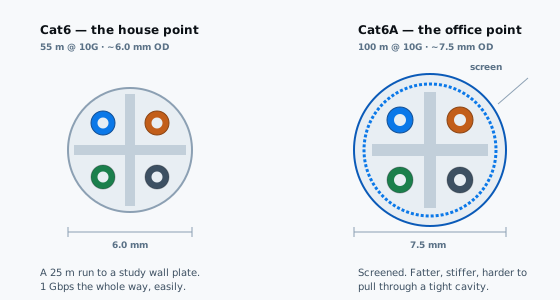
The cable is a small slice of what a data point installation costs, and the labour to pull it is identical either way. That asymmetry is the whole argument, because the cable is the one component you cannot swap later without doing the run again.
| Cat6 | Cat6A | |
|---|---|---|
| 1 Gbps | 100 m | 100 m |
| 10 Gbps | ~55 m | 100 m |
| Outside diameter | ~6.0 mm | ~7.5 mm |
| Screening | Usually unscreened | Screened against alien crosstalk |
| Through a tight cavity | Easier pull | Stiffer, bigger bend radius |
| Sensible for | Houses, short runs | Offices, PoE cameras, long runs |
In a three bedroom house where the longest run is 30 metres, Cat6 is not a downgrade, and the extra 1.5 mm of Cat6A jacket is a real nuisance through a packed cavity. For a commercial data point installation, or anything carrying PoE cameras, put Cat6A in and stop thinking about it.
One thing the spec sheet will not tell you: the manufacturer's instructions are binding on a data point installation. Clause 5.2 of the Wiring Rules requires cabling products to be installed in accordance with them, bend radius and pulling tension included. A cable dragged around a sharp ceiling batten is a compliance problem, not just untidy work.
The limit that shapes every job
One hundred metres, and how it applies to a single run
Copper has a hard ceiling: 90 metres of fixed cable plus up to 10 metres of patch leads at both ends, 100 metres all up. It does not degrade gently past that. Links negotiate down, drop under load, or never come up at all.
In a house this rarely bites. In a long warehouse, a school block or a stretched commercial floor it bites constantly — usually on the single data point installation somebody adds at the far end six months later. Measure the route, not the straight line: up the wall, across the roof, down again, around whatever is in the way.
Where a point sits genuinely beyond reach, the answer is not a longer copper run. It is a second cabinet fed by fibre with a short copper run from there — decided before anyone pulls cable, not after the tester reads 104 metres.
Why one data point installation later costs more than four today
This is the most useful thing on the page. The cable is metres of a cheap thing. What a data point installation really charges for is access: getting into the roof space, moving insulation, finding the top plate, working out which cavity is clear, and getting back out without putting a foot through a ceiling.
That access cost is paid once per visit. Four outlets share it. One outlet carries all of it, plus travel and setup either side. The per-point price of four points is usually well under half the per-point price of one.
The ceiling opens once
Cable pulled before the plasterboard goes up is a fraction of the same cable pulled after. Nobody regrets a spare run; plenty regret the one cut from scope.
Spare capacity is near free
A cable coiled in the ceiling above a likely spot costs a few metres and five minutes. Terminating it two years later is a short visit, not a full one.
Panel ports run out
A 12-port panel full at 12 points means the next data point installation needs a panel too. A 24-port panel half populated never has that conversation.
What a data point installation costs, and what moves the number
I do not publish a per-point figure, and I would be careful with anyone who quotes a data point installation over the phone — the same outlet is a twenty minute job in one house and a two hour job next door. What is honest is naming the variables, so you can read a quote.
Access above and below
A crawlable roof cavity means a fast run. A flat roof, a cathedral ceiling or slab on ground with no subfloor means surface duct or a longer route.
Wall construction
Plasterboard cavity is easy. Solid masonry, rendered brick and double storey walls with fire blocking are where the hours go.
How many points
The biggest lever by far. Points two, three and four each cost dramatically less than point one, because they share the same access.
What is already there
An existing panel with spare ports saves money. With no panel, the first data point installation on a site also includes setting up the cabinet end.
For hourly work — a fault, a single addition, a callout — published rates for comparable cabling work in Brisbane sit around the $185 an hour mark for standard hours. Useful as a sanity check on any quote you are handed, in either direction.
What to send me: what the building is, roughly where the points go, where the modem or cabinet sits now, and whether there is roof or subfloor access. Four answers and most of a data point installation can be priced without a site visit.
How the day runs on a small data point installation
A one or two outlet job follows the same sequence as a fitout, compressed into a morning. Mark the plate positions in pencil, check the roof or subfloor access, find the mains runs to be avoided. Then pull the cable from the cabinet end out, left long at both ends.
After that: cut in the mounting block, punch the keystone, clip the plate on, terminate the far end, patch it to a switch port. Tester on the link, result saved, both ends labelled, dust cleaned up. A data point installation that does not pass gets re-terminated before I leave, not after you ring back.
A data point installation is not finished at the link light
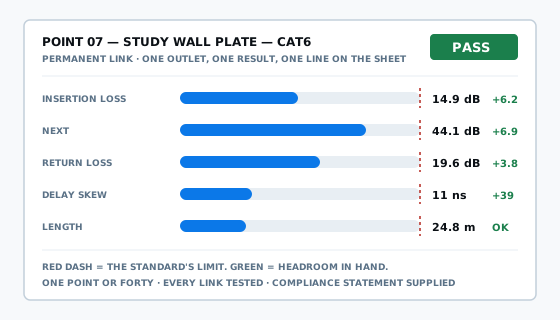
A link light means two devices agreed on something. It does not mean the link meets the standard it was sold as. A badly punched jack will carry a gigabit over 20 metres in a quiet house and fall over the moment the run is long or the building is electrically noisy.
So a one-outlet data point installation gets tested exactly as eighty do: insertion loss, near-end crosstalk, return loss, delay skew and length, on all four pairs, against the limit for the category installed. Look for headroom rather than a bare pass — a link scraping in with a fraction of a decibel spare is one aged termination from failing.
What those numbers mean, and what a certified result should look like, is covered in cable testing and certification. The short version: you should get the result in writing without asking.
Who may lawfully carry out a data point installation in Queensland
Fixed cabling that connects to a telecommunications network can only be installed by a registered cabling provider, or by someone directly supervised at all times by one. That is section 21 of the Telecommunications (Cabling Provider) Rules 2025, which commenced on 31 March 2025. It applies to one outlet in a house exactly as it does to a floor of an office tower.
Queensland adds nothing on top. The Electrical Safety Act 2002 (Qld) says at section 55(3) that an electrical work licence is not required for installing or repairing telecommunications cabling. "Licensed electrician" therefore tells you nothing about who may do your data point installation.
The three classes
Open, restricted and lift. Restricted does not authorise work terminating at a main distribution frame or a patch panel — exactly where the far end of every structured outlet lands. Registration is issued to individuals, never companies.
The statement you are owed
A written compliance statement must be given to you after the work, and section 25 says that applies regardless of whether you have paid. Ask for it on a one-point job the same as a hundred-point one.
Every data point installation is built to AS/CA S009:2020, the Wiring Rules, free to download from the Australian Telecommunications Alliance. To check a cabler before booking, the ACMA cabling registration page explains how the scheme works. Work here is carried out by an ACMA registered cabler, registration no. 42489, open class.
Data point installation questions I get asked
What is a data point, exactly?
One network socket — wall, floor box or ceiling bracket — with its own cable back to a patch panel and nothing sharing it. The Wiring Rules call it a Telecommunications Outlet: a connecting device an ordinary person plugs equipment into, normally a wall plate holding one or more sockets.
How much does a single data point installation cost in Brisbane?
It is quoted per job, not off a price list, because the cable is cheap and the access is not. One outlet on its own carries the whole travel and setup cost. Published rates for comparable Brisbane cabling work sit around $185 an hour for standard hours.
How many data points should a home office actually have?
Two at the desk minimum, so a computer and a second device never fight over one socket. A third if a printer or small switch lives in the room. The commercial convention is two outlets per work area, and a home office is a work area.
Can a data point go in the same wall box as a power point?
Not sharing the same space. AS/CA S009:2020 requires telecommunications cabling to stay 50 mm clear of low voltage power along the run and 150 mm clear at terminations, unless a permanent, rigidly fixed barrier of insulating material or earthed metal sits between them.
Do I need a registered cabler for a data point installation in Queensland?
Yes. Cabling connected to a telecommunications network must be done by a registered cabling provider, or by someone directly supervised at all times by one. Queensland adds no electrical licence on top — the Electrical Safety Act 2002 says at section 55(3) that one is not required.
How long does it take to install one data point?
In a house with a roof cavity above the wall it is a short visit: find the cavity, drop the cable, cut in the plate, terminate both ends, test. Blocked cavities, double storey walls and rendered masonry make it longer. The building decides, not the price list.
Can you add a data point to a room with no roof access above it?
Usually, but the path changes. Options are a subfloor run, a route through an adjoining wardrobe, or surface duct along a skirting or cornice. Surface duct is the one people resist and then accept once they see it painted in. You hear about it before work starts.
Should a new data point be wired in Cat6 or Cat6A?
For a house where the longest run is under 40 metres, Cat6 is the right cable, not a compromise — it carries a gigabit the full 100 metres. Cat6A earns its money on commercial sites, long runs, and anywhere 10 gigabit or heavy PoE is planned.
Will installing a data point wreck my walls?
In most Brisbane homes with a roof cavity, the only opening made is the one the wall plate covers. The cable drops inside the cavity from above, so there is nothing to patch and repaint. Masonry walls and blocked cavities turn up during the walk-around, not mid-job.
Do I get test results for a single data point, or only for big jobs?
For a single point too. One outlet is one permanent link and it gets tested against the standard it was built to. You also get the written compliance statement required by section 25 of the Cabling Provider Rules, supplied whether or not the invoice has been paid.
Get a data point installation quote
Tell me how many outlets, roughly where they go, and what the building is. A small data point installation can usually be quoted off those answers, without a site visit.
Or just call 07 3521 8082. If it goes to voicemail I am up a ceiling somewhere; leave a message and I will call back.
ACMA registered cabler no. 42489 All work to AS/CA S009:2020