Existing Brisbane houses · retrofit
Home network installation Brisbane houses were never wired for
A home network installation in a house that is already built is a different trade to wiring a slab before the frame goes up. The cable is the cheap part. Finding a tidy, legal path through a roof cavity, a subfloor or a wall that was closed up in 1974 is the job you are actually paying for.
ACMA registered cabler no. 42489 Installed to AS/CA S009:2020 Compliance statement every job

Nearly every enquiry starts the same way. The internet is fine near the router and useless in the back bedroom, someone at work said get a mesh system, and it helped a bit but the video calls still stutter. What that house needs is not more radios. It needs two or three cables in the right places.
This page is about retrofitting: putting cable into a house that is already lived in, already painted and already full of furniture. Retrofit home network installation work is half cabling and half building surveying. For the commercial side of the trade, the structured cabling overview covers offices, warehouses and comms rooms.
What a home network installation involves in an existing house
Strip the jargon and a home network installation is four things: a central point where everything comes back to, a path from that point into the roof or under the floor, a set of runs out to fixed locations, and an outlet on the end of each one. Nothing daisy-chains. Each run is its own cable, so a damaged one takes out a single room.
The retrofit part is what makes it interesting. In a new build the cable goes in while the frame is open and anyone can see where it went. In an occupied house nobody can see anything, so the first half hour of a home network installation is spent in the roof with a torch working out whether cable can get from A to B without opening a ceiling.
The hub and the way up to it
A cupboard, garage wall or laundry shelf holding the router, switch and patch point, plus a path from it into the roof or the subfloor. No path, no job.
The drops
Down inside a wall cavity to a plate, or straight out of the ceiling for an access point. Either it goes cleanly or it turns into a patch and paint job.
Termination and test
Outlets, patch panel, matching labels at both ends, every link tested. A home network installation is not finished until that paperwork exists.
The reason most people call
Why one router in the corner never covers a brick-and-tile house
The router is almost always in the wrong place, and not by anyone's fault. It sits where the phone socket or the NBN box landed — in a lot of Brisbane houses, the front corner of a bedroom or the garage — and is then asked to cover a floorplan that runs away from it in one direction only.
Then the building fights it. Brick cavity walls, tiled roofs, foil-faced sarking and insulation batts all attenuate a wireless signal, and 5 GHz suffers considerably more of that than 2.4 GHz does. So the phone shows three bars of a 5 GHz network that cannot actually move data, or quietly falls back to a slower band and the video call breaks up.
Adding a mesh node helps, right up until you look at how it gets its data. A node with a wireless backhaul spends the same airtime twice — once talking to your laptop, once talking back to the main unit. Two hops out and there is not much left. The same nodes fed by cable behave like different products entirely, which is what a home network installation is quietly buying you. For the ceiling point count and PoE budget behind a proper wireless access point cabling job, that page goes deeper than a home retrofit needs to.
What cable fixes that radios cannot
Distance, walls and contention. A ceiling access point in the middle of the house serves the rooms around it at short range, on a cable sharing airtime with nothing. Coverage complaints usually end there rather than at a router upgrade.
What cable does not fix
A slow service is still slow on Cat6. A home network installation makes the house consistent, not faster, and that is worth saying before anyone spends money on it for the wrong reason.
The honest test: run a speed test standing next to the router, then run it in the room that annoys you. If the first is fine and the second is a third of it, that is a coverage problem and cable fixes it. If both are equally poor, the problem is the service, and no home network installation changes that.
Roof cavity, subfloor or slab — the house decides the job
Everything about price and disruption comes down to one question: where can cable travel horizontally? Brisbane gives three broad answers, and which one your house gives moves a home network installation quote further than the number of points does.
| House type | Cable path | What limits it |
|---|---|---|
| Post-war brick, tiled roof | Roof cavity, drops down internal walls | Sarking, low pitch at the eaves, blocked cavities |
| Timber Queenslander, high-set | Subfloor along the bearers, up from the bottom plate | Enclosed under-house rooms, termite barriers |
| 2000s brick veneer on slab | Roof cavity only | No subfloor at all — the roof is the single option |
| Two storey, slab lower level | Roof to upper floor, then internal walls down | Getting between floors is the whole problem |
| Flat or raked ceiling | Very limited | No cavity to crawl; surface duct or bulkheads |
The slab-on-ground estate house is the one that surprises people. It looks modern and it often has the fewest options, because there is no subfloor to fall back on and the roof is the only route. If that roof is also a low-pitch truss design with sarking stapled under the battens, the workable area shrinks to the middle of the house, and a home network installation there is planned around what the roof allows rather than what the floorplan suggests.
Two-storey houses are their own puzzle. Getting cable from the roof down into a ground-floor wall usually means finding a wardrobe, a stairwell bulkhead or a wet-area duct that lines up on both levels. There is nearly always one, and finding it is the difference between a clean home network installation and a patched wall.
The Queenslander on stumps, and why it is often the easy one
The classic Brisbane timber house — VJ or single-skin walls, iron roof, up on stumps with the laundry underneath — reads as difficult and usually is not. A high-set house gives you standing or crouching room under the floor, an open run along the bearers, and a straightforward path up inside the wall from the bottom plate.
That flips the usual method on its head. A home network installation in a high-set house comes up from below instead of down from the ceiling, which suits a roof space that is a shallow triangle of iron and rafters hitting fifty degrees by ten in the morning.
What helps, what stops you
Timber framing drills easily and the subfloor is open, so a laundry-hub-to-front-bedroom run is often shorter underneath than over the top. Low-set stumps, a lined-in under-house area or termite management that must not be disturbed end that advantage.
The single-skin problem
Older Queenslander internal walls are sometimes one layer of boards with the framing exposed on one side. There is no cavity to drop into, so the outlet goes on an external wall, in a skirting duct, or inside a wardrobe.
Flood-prone stock
Plenty of Brisbane's low-set housing has been under water. Anything landing in a subfloor gets kept high and dry, and the hub itself belongs upstairs rather than in the under-house laundry.
Renovated Queenslanders complicate it again. Once the under-house is built in as living space that subfloor advantage disappears and the job goes back to the roof — which above a raked ceiling extension may not exist either. Worth checking before anyone quotes a home network installation on a renovated character house.
Wall cavity drops — the part that decides whether you patch and paint
The drop is the moment of truth. Cable arrives at the top plate above the wall, a hole is drilled through it, and the cable is fed down inside the cavity to a cut-out for the plate. When it works, the only mark left on the house is the rectangle the wall plate covers.
Noggins
Horizontal blocking between studs, usually about halfway up. A weighted draw chain finds them quickly, and often the fix is choosing a plate height below the nogging rather than above it.
Insulation
Wall batts are the most common reason a drop stalls. The cable stops dead a third of the way down and no amount of feeding helps.
Masonry and render
Double brick or rendered block has no cavity to drop through. The cable has to arrive at ceiling level, in surface duct, or through an adjoining stud wall instead.
The honest alternative
Where a cavity is genuinely blocked, a home network installation falls back to a different outlet position, a length of surface duct, or a small access hole that gets patched. All three get raised before the drill comes out.
Ceiling points
Access points and cameras mount straight to the ceiling, so there is no drop at all — just a hole the size of the mounting plate. Easiest points in the whole house.
This section is the entire reason a home network installation gets quoted after a walk-through instead of over the phone. Two identical-looking houses in the same street can be half a day apart depending on what is inside the walls.
What actually needs cabling, and what can stay wireless
A home network installation does not need a data point in every room. The rule that has never let anyone down: cable the things that do not move, leave the things that do on Wi-Fi. Phones, tablets and laptops move. Televisions, desks, access points and cameras do not.
Cable these
The study desk, ideally two outlets. The TV wall. One or two ceiling points for access points. Anywhere a camera, doorbell or recorder will end up.
Leave these wireless
Phones, tablets, laptops on the couch, speakers, and the growing collection of plugs and sensors that were only ever designed for Wi-Fi.
The point people forget
A ceiling point in the hallway or the middle of the house. It looks like the least useful outlet on a home network installation plan and it is the one that fixes the complaint that started the conversation.
The one people over-order
Four points in a bedroom that will hold a bed and a lamp. One is plenty, and a small switch behind a desk handles the day a second device turns up.
Where a house is getting PoE cameras or a doorbell, those runs are worth including in the same home network installation even if the cameras are a year away. The cable is a small share of the cost and the roof access is the expensive part — you are already paying for it once.
Where every run lands — choosing the hub
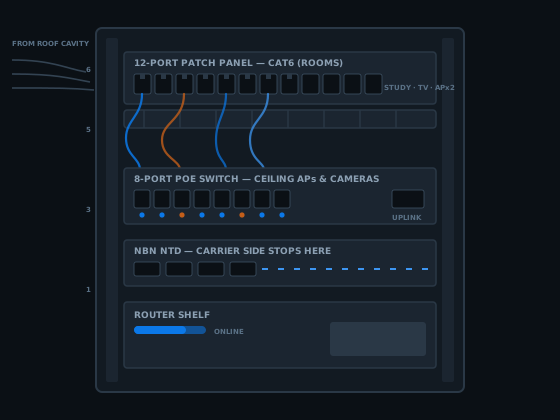
Every cable in a home network installation comes back to one place, so picking that place well matters more than people expect. It wants power, a bit of ventilation, protection from weather and from a car reversing into it, and a position roughly central to the runs rather than in the furthest corner.
In most houses the hub of a home network installation ends up in a laundry cupboard, a garage shelf, a linen cupboard or a small wall cabinet in a study. Meter boxes and external pits are not it — heat, moisture and insects finish equipment off faster than anything else in a Queensland house.
The NBN box is not the hub. NBN Co owns the network termination device and everything up to it. Your side of that box is private cabling a registered cabler can work on freely, which is how a badly placed connection point gets solved without anyone moving carrier equipment. The boundary is set out in the guide to NBN cabling in Brisbane.
Hub position also sets run lengths, and those are governed by the channel limit: 90 metres of fixed cable plus up to 10 metres of patch leads, 100 metres in total. Houses rarely go near it. Acreage does, and a run out to a shed or granny flat past that distance is where fibre optic cabling stops being exotic and becomes the only thing that works.
Cat6 or Cat6A for a home network installation
Short version: for a home network installation in a house, Cat6 is not a downgrade. It carries a gigabit to 100 metres and 10 gigabit to around 55 metres, which is longer than any run in a normal Brisbane house. Cat6A holds 10 gigabit across the full 100 metres because it is screened against alien crosstalk, and it is thicker and stiffer for it.
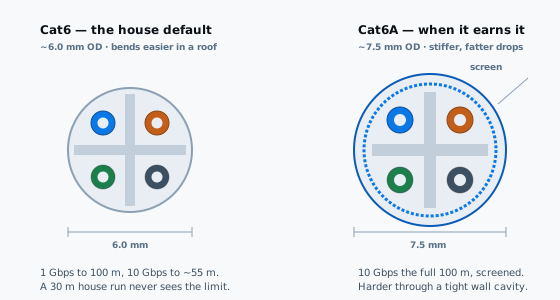
| Cat6 | Cat6A | |
|---|---|---|
| 1 Gbps | 100 m | 100 m |
| 10 Gbps | ~55 m | 100 m |
| Outside diameter | ~6.0 mm | ~7.5 mm |
| Through a tight cavity | Easier — bends and feeds well | Stiffer, harder past a nogging |
| Existing 20 mm conduit | More cables fit | Fewer — plan for it |
| Worth it when | Runs under 50 m, most houses | Long two-storey runs, a 10G study link |
That size difference sounds trivial until you are feeding four cables down one cavity past a nogging. It is the real reason Cat6 stays the default for a home network installation — not cost, but that it goes where the house lets it go. Where someone wants 10 gigabit between a study and a hub, running that one link in Cat6A and the rest in Cat6 is a sensible split rather than a compromise.
Testing, certification and who may lawfully do the work
Houses get treated as the casual end of this trade and they should not be. A home network installation sits under exactly the same law as an office fitout. Section 21 of the Telecommunications (Cabling Provider) Rules 2025, in force since 31 March 2025, allows the work only where the person doing it holds cabling provider registration — or is directly supervised at all times by someone who does. Up to 100 penalty units for getting that wrong.
No Queensland licence sits on top of that either. Section 55(3) of the Electrical Safety Act 2002 (Qld) puts telecommunications cabling outside the scope of an electrical work licence altogether. So a sparky quoting your house being licensed proves nothing about this particular work. Ask instead for the cabler registration number, which belongs to a person rather than to a business.
The standard
Section 23 makes AS/CA S009:2020 compulsory. The Australian Telecommunications Alliance hands it out free if you want to read what your own house was built to.
What gets tested
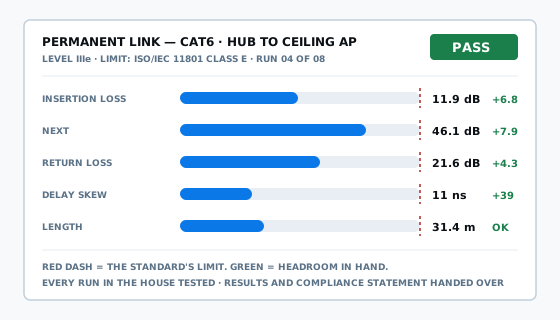
Every pair, both ends, measured for loss, crosstalk, reflection, skew and distance. A link light proves nothing — a termination that barely scrapes past the limit today is the one that drops out in three years.
Your paperwork
Your test sheet, plus the statement of compliance section 25 obliges the cabler to hand over as soon as practicable — paid invoice or not.
Keep that statement with the house documents. It is the only proof the home network installation was done lawfully rather than by whoever owned a drill, and it is what a buyer's building inspector or an insurer will ask about.
What a home network installation costs to retrofit
Nobody in this trade publishes real numbers, which makes a home network installation quote hard to compare against another one. Here is how the pricing works, so you can read one.
Priced per point
One rate per outlet, covering everything that outlet needs to work and be proven. The rate drops as the count goes up, because getting into the roof once and cabling eight points beats doing it twice for four.
Priced hourly
Fault finding, one added outlet, or chasing why a single room drops out. For a sense of scale, published rates for comparable work sit near $185 an hour in standard hours, and evenings or weekends cost more than that.
What moves the number is access, every time. One outlet into a room with a walkable roof cavity above it is straightforward. The same outlet in a rendered two-storey with a raked ceiling is a different job at a different price, and the cable in both is identical. That is why a home network installation gets quoted after someone has looked in the roof.
Read a house quote for one thing: what happens when a cavity turns out to be blocked. A quote that names the fallback and prices it is a quote from someone who has been in a few Brisbane roofs. Silence there is where the variations come from.
One more piece of maths. Four points now and four next year costs noticeably more than eight today, because the access work happens twice — so a point you are likely to want within a couple of years is cheaper inside this home network installation than as its own visit later.
Home network installation questions Brisbane homeowners ask
Does a home network installation mean holes cut in my walls?
In a house with a roof cavity, usually not. The cable travels across the ceiling, through a hole drilled in the top plate, and drops inside the wall cavity to a standard plate cut-out. The only opening left behind is the one the wall plate covers. Blocked cavities, noggings and masonry walls are the exceptions, and they get found on the walk-through.
Can a Queenslander on stumps be cabled from underneath instead of the roof?
Often, yes, and it is frequently easier than the roof. A high-set timber house gives standing room under the floor, so cable runs along the bearers and comes up inside the wall from the bottom plate instead of the top. Low-set stumps with 400 mm of crawl space are a different story, and termite management or an enclosed under-house area changes the route again.
Will a mesh Wi-Fi system do the same job as a home network installation?
Not the same job. A mesh node that talks back to the main unit over Wi-Fi is sharing the same airtime it is trying to serve, so throughput drops with each hop. The same nodes wired back to a hub behave completely differently, because each one gets a full-speed path home. Mesh is a good product hamstrung by a wireless backhaul.
How long does a home network installation take in an existing Brisbane house?
A handful of points in a single-storey house with a walkable roof cavity is usually a day. Two storeys, a tiled roof with sarking, or a hub that has to move to the other end of the house pushes it further. The variable is almost never the cable, it is how long it takes to find a legal path for each run.
Can a slab-on-ground house with a raked ceiling still be retrofitted?
Sometimes, with compromises. No subfloor and no crawlable roof means the honest options are surface duct along a skirting or cornice, a route through an existing wardrobe or bulkhead, or cabling only the walls that back onto an accessible section. That trade-off gets shown to you before the quote, not discovered on the day.
Do I need a registered cabler to run data cable inside my own house?
If the cabling connects to a telecommunications network, yes. Section 21 of the Telecommunications (Cabling Provider) Rules 2025 requires a registered cabling provider, or someone directly supervised at all times by one. It applies to houses exactly as it applies to offices, and the penalty for breach runs to 100 penalty units.
How many data points should a home network installation put in a four bedroom house?
Cable the things that will not move. That is typically the study desk, the TV wall, one or two ceiling points for access points, and a run to wherever cameras or a doorbell will land. Eight to twelve points covers most four bedroom houses. Adding one on the day is minor, adding one next year means the whole access process again.
Can the NBN connection box be moved somewhere better while the house is cabled?
The network termination device itself belongs to NBN Co and only they relocate it. What a registered cabler can do is run new cabling on your side of it, so the router and switch live somewhere sensible and a single link feeds them from wherever the box sits. That solves most badly-placed connection points without touching carrier equipment.
Get a home network installation quote
Tell me what the house is — era, single or two storey, tin or tile, on stumps or on a slab — and roughly which rooms annoy you. That is usually enough to say whether the home network installation is a simple day or a harder one before anyone turns up.
Or ring 07 3521 8082 directly. Voicemail usually means I am halfway along someone's roof cavity — leave the suburb and the house type and I will ring back.
ACMA registered cabler no. 42489 All work to AS/CA S009:2020