Brisbane & South East Queensland
NBN equipment installation, technology by technology
An nbn equipment installation looks completely different depending on what reached your street — a box and an optional battery on full fibre, a single modem on HFC, nothing at all on FTTN beyond the phone socket in the wall. This page runs through every technology so you know what's sitting in your house before you ring anyone.
ACMA registered cabler no. 42489 Installed to AS/CA S009:2020 Compliance statement every job
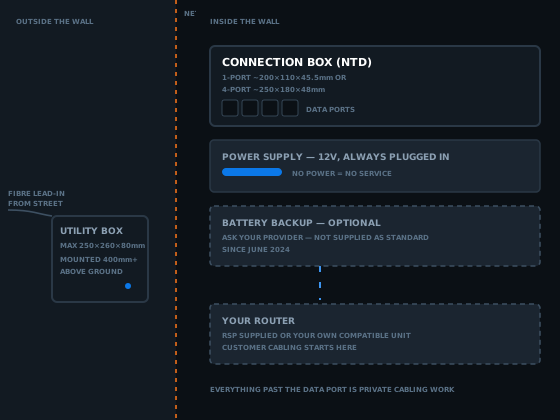
Every nbn equipment installation drops a different mix of gear at the premises, and almost none of it belongs to whoever pays for the internet. nbn Co owns everything up to and including whichever box, modem or device ends up on the wall, regardless of which technology reached your street.
This page runs the whole mix: what's mounted where on FTTP, FTTC, HFC, FTTN and FTTB, what nbn Co no longer supplies as standard, and which of it a registered cabler can touch. For the legal boundary — who's allowed to do what, and why — start with the nbn cable installation hub. For the one box most of this equipment hands off to, the NTD installation guide goes a lot deeper into that single device.
What an nbn equipment installation actually covers, technology by technology
Five technologies, five different equipment lists. Some leave a box on the wall that needs its own power point; some leave nothing beyond the phone socket that was already there. Knowing which applies to your address is the first useful fact in any nbn equipment installation conversation.
| Technology | Outside the wall | Inside the wall | You supply |
|---|---|---|---|
| FTTP | Utility box | Connection box (NTD), power supply | Router |
| FTTC | Distribution Point Unit, in a street pit | Connection device (NCD) | Router |
| HFC | None — uses existing coax | Connection box | Router |
| FTTN | None | None — existing phone socket | VDSL2 modem |
| FTTB | None | None — building node cabinet feeds existing wiring | VDSL2 modem |
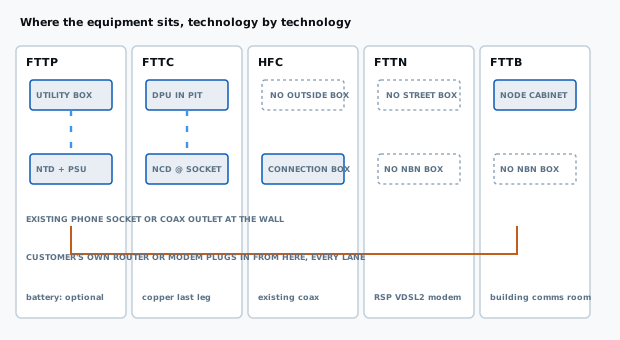
Two technologies get no equipment at all — FTTN and FTTB reuse the copper and telephone socket already in the wall. Three get a powered box that has to sit somewhere sensible, near an outlet, before anything else can be cabled off it. That's the whole reason a second data point quote can't be given over the phone without knowing your technology.
Full fibre (FTTP): the nbn equipment installation with the most gear
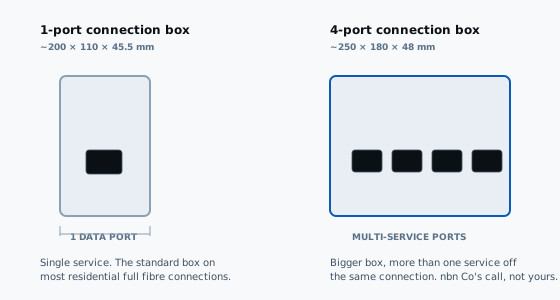
Full fibre leaves the most hardware behind of any nbn equipment installation. A fibre lead-in comes from the street to an nbn utility box mounted on the outside wall — up to 250 by 260 by 80 millimetres, positioned no lower than 400 millimetres off the ground, near existing power and phone infrastructure where possible. A short internal fibre run then carries the connection to a connection box inside, which nbn Co's own FTTP page confirms comes in two sizes: a smaller 1-port model and a larger 4-port model for more than one service off the same box.
Both the connection box and whatever router sits beyond it need mains power — this technology doesn't run on the phone line the way old copper services did. That fact explains most full fibre outages that aren't network faults: a power board switched off in a garage, or a double adaptor unplugged to run a vacuum cleaner.
What nbn Co installs
The utility box, the internal fibre lead, and the connection box — the full nbn equipment installation. All three stay nbn Co's property once mounted.
What you or your provider supply
A router compatible with the network, plugged into the connection box's data port by Ethernet. Whether it comes from your provider or is one you bought is your call.
Hybrid fibre coaxial (HFC): one box, no separate utility box outside
An nbn equipment installation on HFC reuses the old pay TV coaxial cable for the final stretch into the building, which changes the equipment list. There is no outside utility box the way there is on full fibre — the existing coax wall outlet does that job. What does get installed is an nbn connection box at the point the coax enters the premises, and nbn Co's own connection box page lists four ports on it: an Ethernet port for your router, a fixed coax port to the wall outlet, a power port, and a reset button.
Like every powered technology here, the HFC box needs mains power and comes with its own dedicated adaptor. Everything past it — the router, the Ethernet lead — is customer supplied, same as full fibre. An nbn equipment installation on HFC is the simplest of the powered technologies: one box, one cable in, one cable out.
Fibre to the Node and Fibre to the Building: no nbn box at all
This is the pair of technologies where an nbn equipment installation installs nothing at the premises. On FTTN, fibre reaches a street cabinet and the existing copper phone line carries the signal the rest of the way to your existing telephone socket. On FTTB, common in older apartment blocks, fibre reaches a node cabinet in the building's communications room and the same principle applies through the building's internal wiring instead of a street pair.
Fibre to the Node
Nothing is installed at your address unless a socket needs adding. Your provider posts a VDSL2 modem; the physical work happens at the node, which is why FTTN skips a technician visit entirely.
Fibre to the Building
The node cabinet sits in the comms room, not your unit. Everything from there to your socket is existing internal wiring, some decades old, carrying a signal it was never designed for.
Either way, the modem is the one piece of gear in the whole nbn equipment installation, and it comes from your retail provider rather than nbn Co. It has to be a genuine VDSL2 device that supports nbn's technical specification — covered properly in the compatibility section below.
Equipment split across two locations
Fibre to the Curb: equipment in the street and on the wall
An nbn equipment installation on FTTC sits between full fibre and the copper technologies. Fibre runs to a small Distribution Point Unit, generally housed inside a pit at the kerb, and a short run of existing copper carries the signal the last stretch to the premises. Inside, an nbn connection device — sometimes called an NCD — plugs into the existing telephone wall socket.
Where the connection device has to sit
Per nbn Co's own FTTC page, within about 80 centimetres of a power outlet, in a cool, dry, ventilated spot — not a kitchen, bathroom, laundry, or under a window that opens.
What it connects to
Power, the telephone cable back to the wall socket, and an Ethernet lead out to your router. Three solid blue lights on the unit mean the connection is up.
Older 600-series phone sockets sometimes need an adaptor to take the connection device's RJ11 plug, which is a five-minute fix rather than a real problem — but it's exactly the kind of detail an nbn equipment installation on FTTC trips people up on if nobody mentions it first.
Fixed Wireless and Sky Muster: the equipment goes on the roof
Outside the metro footprint, towards the fringes of Ipswich and Toowoomba, an nbn equipment installation can mean neither a box on the wall nor a modem in a drawer, but an aerial. Fixed Wireless installs an outdoor antenna on the roof, under the eaves, or on a wall facing the transmission tower, feeding an nbn connection box — the same NTD terminology used elsewhere — mounted inside.
Sky Muster satellite goes further again: a dish roughly 80 to 120 centimetres across, cabled to an nbn connection box, a dedicated power pack, and a wall outlet inside. Both share one drawback worth knowing before you rely on them for anything else: neither keeps working through a power blackout, which matters if a medical alarm is plugged in downstream — the whole reason a Fixed Wireless or satellite nbn equipment installation deserves an honest conversation about backup power before it goes live, not after.
Battery backup — why it's no longer part of a standard nbn equipment installation
This is the part of an nbn equipment installation that's changed the most in the last couple of years, and it still trips people up because a lot of what's written about it online is out of date. Full fibre connections used to come with an optional power supply unit that included a battery. According to nbn Co's own battery back-up page, from June 2024 nbn Co no longer offers that unit as standard on new connections — if you want one, the request goes to your phone and internet provider, who may be able to arrange it separately.
What it runs, and for how long
Where a battery is part of the nbn equipment installation, it powers the connection box for around five hours during an outage — roughly three to three-and-a-half hours before the reserve kicks in, and another ninety minutes once the emergency button is pressed. It keeps a corded phone working, not your Wi-Fi router.
Who actually needs one
Anyone on a medically necessary landline, a monitored alarm, or registered for Priority Assistance should raise it with their provider directly rather than assume nbn Co supplies one automatically.
The honest summary: an nbn equipment installation on full fibre today does not come with a battery unless somebody specifically arranges one. That's a phone call worth making before the connection goes live, not an assumption to carry into it.
Compatibility — whose equipment is whose, and what you can swap
Compatibility questions come up constantly on an nbn equipment installation, and the honest answer changes depending on the technology. On the copper technologies you have real choice. On the fibre and coax technologies you don't, past the router.
FTTN and FTTB — bring your own modem
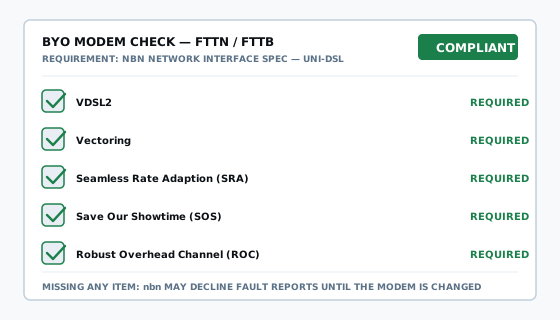
Your provider usually supplies a VDSL2 modem, but nbn Co's own device compatibility page confirms a customer can use their own, as long as it fully supports the network interface specification — VDSL2, vectoring, seamless rate adaption, save our showtime and robust overhead channel. Miss one of those and nbn Co may decline fault reports until the modem is changed.
FTTP and HFC — the box stays, the router doesn't
No swapping the connection box on either nbn equipment installation type; it's nbn supplied regardless of preference. What you choose freely is the router on its data port — provider supplied, or your own, as long as it talks Ethernet.
Medical alarms deserve a mention here too, since compatibility for them isn't only technical — it's about power continuity. nbn Co is explicit that Fixed Wireless and satellite stop working in a blackout, and recommends checking with your alarm provider before switching services.
Inside the wall versus outside it
What can move, and what stays nbn Co's call
Every nbn equipment installation eventually raises the same question: can the box go somewhere better. The answer splits cleanly on one line — the wall itself. A registered cabler can relocate nbn supplied equipment inside a premises under nbn Co's Authority to Alter guidelines, without a separate application. Equipment outside the building — the utility box, the lead-in cable, anything in a street pit — is nbn Co's alone, through its own paid relocation works process.
What a cabler can move
The connection box, its power supply and immediate cabling, off a cluttered wall this week rather than next quarter.
What only nbn Co can move
Anything visible from the street, plus Fixed Wireless antennas and satellite dishes, regardless of how inconvenient the roofline is.
This page covers the equipment itself, not the paperwork. The relocation process for any nbn equipment installation — the timeframes, the exceptions for Fixed Wireless and satellite — is its own subject, and who can legally move an nbn box is where that detail lives.
Where a registered cabler's job starts, once the nbn equipment installation is done
Nothing on this page is private cabling work. The utility box, the connection box, the DPU, the VDSL2 modem — all of it sits on the carrier side, installed by nbn Co or supplied by your provider. A registered cabler's job begins at the data port of whichever box landed at your address, running, testing and certifying everything from there outward.
That boundary is federally regulated. Cabling that connects to a telecommunications network must be carried out by a cabling provider registered under the Telecommunications (Cabling Provider) Rules 2025, or by someone directly supervised at all times by one. Registration sits with individuals, never companies, which is why the honest phrasing here is that work is carried out by an ACMA registered cabler — registration no. 42489 — not that the business holds a licence.
Worth asking anyone quoting work off nbn equipment: their registration number, whether it's open or restricted class, and whether the compliance statement under section 25 of the Cabling Provider Rules is included. Details on the class system sit on the ACMA's cabler registration page.
For a couple of extra outlets once your nbn equipment installation is live, data point installation is the general page. For the box most of this equipment hands off to, the NTD installation guide covers that device properly, and the nbn install process covers the day itself, start to finish.
What it costs from here, once the nbn equipment installation is finished
Everything nbn Co installs is arranged and priced through your retail provider — none of that is this trade's territory. What gets quoted here is the private cabling that starts at whichever box, modem or device landed at your address.
Priced per point
New runs off the equipment to outlets are quoted per point — cable, terminations, wall plate, testing and labelling included. The rate falls as the outlet count rises.
Priced hourly
Relocations and fault finding are hourly. Published Brisbane rates for comparable work sit around the $185 per hour mark standard hours, after-hours carrying a premium.
Access drives the number more than the equipment does. A roof cavity above the box makes for a straightforward nbn equipment installation follow-up job; a slab home with the box in an awkward corner takes longer, whichever technology put it there.
nbn equipment installation questions I get asked
What equipment does an nbn equipment installation on full fibre actually involve?
Two boxes, minimum. An nbn utility box goes outside, up to 250 by 260 by 80 millimetres, fed by fibre to a connection box inside — the NTD — in a 1-port or 4-port model. Both boxes are nbn supplied; the router beyond the connection box's data port is not.
Does nbn Co still supply a battery backup unit as part of an nbn equipment installation?
Not as standard. Since June 2024 nbn Co no longer offers a power supply unit with battery backup on new connections — ask your phone and internet provider, who may be able to arrange one. Where fitted, a charged unit runs the connection box for around five hours during a blackout.
What's the difference between the 1-port and 4-port nbn connection box?
Size and capability. The 1-port box is smaller, around 200 by 110 by 45.5 millimetres, and hands off a single connection. The 4-port model, roughly 250 by 180 by 48 millimetres, supports more than one service from the same box. Which one lands at your address is nbn Co's call, not yours.
What equipment gets installed for an HFC nbn connection?
Just one box, unlike full fibre. An nbn connection box — effectively a cable modem — connects to the existing pay TV coax outlet and needs mains power to run. It has an Ethernet port for your router, a coax port, a power port and a reset button. No separate outside utility box on HFC.
Is there any nbn box at all for FTTN or FTTB connections?
No. FTTN and FTTB both stop short of your premises — a street cabinet for FTTN, a node cabinet in the building's comms room for FTTB — and existing copper telephone wiring carries the signal the rest of the way. Your provider posts a VDSL2 modem, which plugs straight into the existing phone socket.
Can I use my own modem instead of the one nbn Co or my provider supplies?
On FTTN and FTTB, yes, provided it's a genuine VDSL2 modem fully supporting nbn's technical specification, including vectoring. On full fibre and HFC the nbn supplied box stays regardless — what you can substitute is the router on its data port, not the box itself.
What equipment sits in the street for a Fibre to the Curb connection?
A Distribution Point Unit, usually inside a street pit, where the fibre ends and existing copper takes over for the last stretch. Inside, a connection device plugs into the existing telephone socket, sitting within about 80 centimetres of a power outlet, in a dry, ventilated spot rather than a kitchen or bathroom.
Does a medical alarm work reliably with the equipment nbn Co installs?
Not automatically. Fixed Wireless and satellite are the connections nbn Co flags specifically, since that nbn equipment installation stops working in a power outage. Check compatibility with your alarm provider before switching, ask your phone and internet provider about Priority Assistance, and test the alarm again once the new connection is live.
Can a registered cabler relocate the nbn equipment already installed in my home?
Generally yes, inside the house — a registered cabler can move a connection box under nbn Co's Authority to Alter guidelines once the initial nbn equipment installation is done. Anything mounted outside, including the utility box and lead-in cable, is nbn Co's alone to relocate, through its own paid application process.
What powers the equipment nbn Co installs, and what happens if the power goes out?
Every nbn connection box needs mains power to operate, on every technology that uses one. Without power, or a battery backup, the service stops the same way your home Wi-Fi does — worth knowing before assuming a mobile phone will always be the fallback during an outage.
Get a quote for cabling off your nbn equipment
Tell me which technology is at your address if you know it, and what you want cabled from the box, modem or device outward. That's enough to scope most of this work without a guessing game over the phone.
Or just call 07 3521 8082. If it goes to voicemail I am up a ceiling somewhere; leave a message and I will call back.
ACMA registered cabler no. 42489 All work to AS/CA S009:2020